|
The C programming language is
probably the most popular and widely used programming language
on the planet. Programmers around the world embrace C because
it gives maximum control and efficiency to the programmer. If
you are a programmer, or if you are interested in becoming a
programmer, there are a number of benefits you gain from
learning C:
- You will be able to read and write code for the largest
number of platforms - everything from microcontrollers to
the most advanced scientific and corporate systems are
written in C, as are nearly all modern operating systems.
- The jump to the object oriented C++ language becomes
much easier. C++ is an extension of C, and it is nearly
impossible to learn C++ without learning C first.
- C is a common CGI scripting language for web sites. Most
people create their first CGI scripts using PERL, but as a
site becomes more popular PERL often has performance
problems. You can solve performance problems by recoding the
scripts in C.
|
|
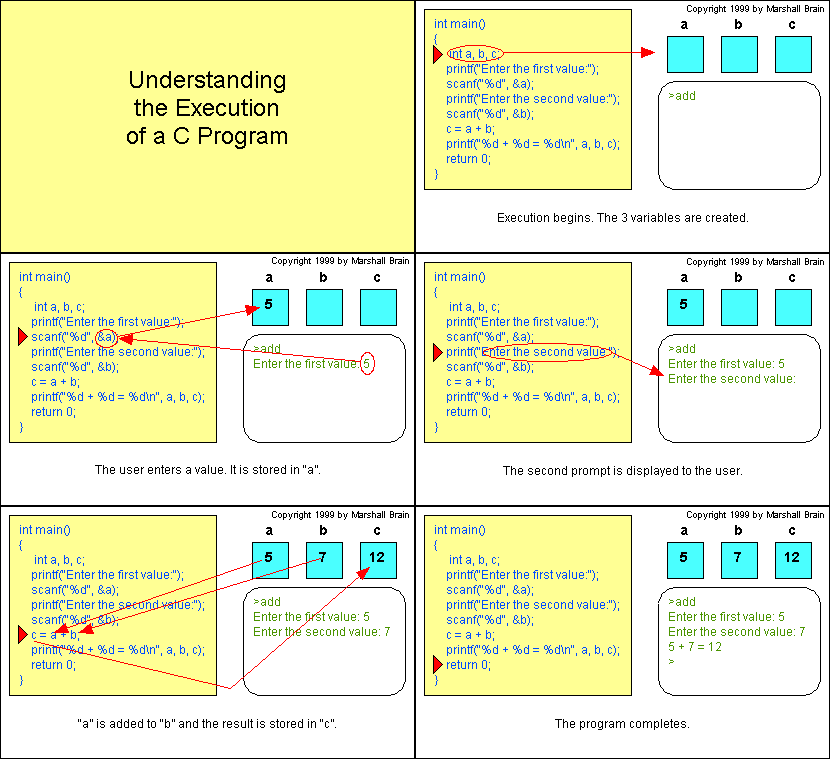
This animation shows the
execution of
a simple C program. By the end of the
second article you will understand
how it works!
|
We will walk through the entire language and
show you how to become a C programmer starting at the
beginning. You will be amazed at all the different things you
can create once you know C! The following articles will lead
your through a complete and thorough introduction to the
language.
What is C?
C is a Computer Programming Language. That means
that you can use C to create lists of instructions for a
computer to follow. C is probably the most popular and widely
used programming language on the planet. It has been around
for several decades and has won widespread acceptance because
it gives programmers maximum control and efficiency. C is an
easy language to learn. C is a bit more cryptic in its style
than some other languages, but you get beyond that fairly
quickly. If you were going to learn just one programming
language, C would give you the most bang for your buck because
it is so popular.
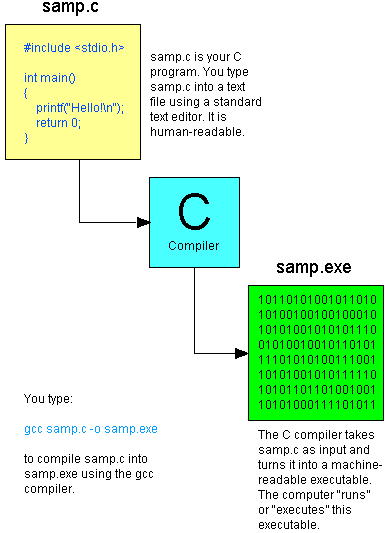
C is what is called a compiled language. This means
that once you write your C program, you must run it through a
C compiler to turn your program into an executable
that the computer can run (execute). The C program is the
human-readable form, while the executable that comes out of
the compiler is the machine-readable and executable form. What
this means is that to write and run a C program you must have
access to a C compiler. If you are using a UNIX machine (for
example, if you are writing CGI scripts in C on your host's
UNIX computer or if you are a student working on a lab's UNIX
machine), the C compiler is available for free. It is called
either "cc" or "gcc" and is available on the command line. If
you are a student, then the school will likely provide you
with a compiler - find out what they are using and learn about
it. If you are running at home on a Windows machine, you are
going to need to download a free C compiler or purchase a
commercial compiler. The most widely used commercial compiler
is Microsoft's Visual C++ environment (it compiles both C and
C++ programs). Unfortunately this program costs several
hundred dollars. If you do not have hundreds of dollars to
spend on a commercial compiler, then you can use one of the
free compilers available on the web. See
http://delorie.com/djgpp/
as a starting point in your search.
In the next article we will start at the beginning with an
extremely simple C program and build up from there. I will
assume that you are using the UNIX command line and gcc as
your environment for these examples, but if you are not all of
the code will work fine. You will simply need to understand
and use whatever compiler you have available.
Let's get started!
The Simplest C Program
Let's start with the simplest possible C program and use it
both to understand the basics of C and the C compilation
process. Type the following program into a standard text
editor (vi or emacs on UNIX, Notepad on Windows or TeachText
on a Macintosh). Then save the program to a file named
samp.c. If you leave off .c, you will probably get
some sort of error when you compile it, so make sure you
remember the .c. Also, make sure that your editor does
not automatically append some extra characters (like ".txt")
to the name of the file. Here's the first program:
#include <stdio.h>

int main()
{
    printf("This is output from my first program!\n");
    return 0;
}
When executed, this program will instruct the computer to
print out the line "This is output from my first program!".
Then the program quits. You can't get much simpler than that!
| When you enter this program, position #include
so that the pound sign is in column 1 (the far left side).
Otherwise, the spacing and indentation can be any way you
like it. On most UNIX systems, you will find a program
called cb, the C Beautifier, which will format code
for you. The spacing and indentation shown above is a good
example to follow. |
To compile this code take the following steps:
- On a UNIX machine, type gcc samp.c -o samp (if
gcc does not work, try cc). This line invokes the C compiler
called gcc, asks it to compile samp.c and asks it to place
the executable file it creates under the name samp.
To run the program, type samp (or, on some UNIX
machines, ./samp).
- On a DOS or Windows machine using
DJGPP, at an MS-DOS
prompt type gcc samp.c -o samp.exe . This line
invokes the C compiler called gcc, asks it to compile samp.c
and asks it to place the executable file it creates under
the name samp.exe. To run the program, type samp.
- If you are working with some other compiler or
development system, read and follow the directions for the
compiler you are using to compile and execute the program.
You should see the output "This is output from my first
program!" when you run the program. Here is what happened when
you compiled the program:
If you mistype the program, it either will not compile or
it will not run. If the program does not compile or does not
run correctly, edit it again and see where you went wrong in
your typing. Fix the error and try again.
Let's walk through this program and start to see what the
different lines are doing:
- This C program starts with #include <stdio.h> .
This line includes the "standard I/O library" into
your program. The standard I/O library lets you read input
from the keyboard (called "standard in"), write output to
the screen (called "standard out"), process text files
stored on the disk, and so on. It is an extremely useful
library. C has a large number of standard libraries like
stdio, including string, time and math libraries. A
library is simply a package of code that someone else
has written to make your life easier (this
page discusses libraries in detail).
- The line int main() declares the main function.
Every C program must have a function named main
somewhere in the code. We will learn more about functions
shortly. At run time, program execution starts at the first
line of the main function.
- In C, the { and } symbols mark the
beinning and end of a block of code. In this case the block
of code making up the main function contains 2 lines.
- The printf statement in C allows you to send output to
standard out (for us, the screen). The portion in quotes is
called the format string and describes how the data
is to be formatted when printed. The format string can
contain string literals such as "This is output from my
first program!", symbols for carriage returns ("\n"), and
operators as placeholders for variables (not shown in this
example - see the next example). If you are using UNIX, you
can type "man 3 printf" to get complete documentation for
the printf function. If not, see the documentation included
with your compiler for details about the printf function.
- The return 0; line causes the function to return
an error code of 0 (no error) to the shell that started
execution. More on this capability a bit later.
Here is another program that will help you learn more about
printf:
#include <stdio.h>

int main()
{
    int a, b, c;
    a = 5;
    b = 7;
    c = a + b;
    printf("%d + %d = %d\n", a, b, c);
    return 0;
}
Variables
As a programmer, you will frequently want your program
to "remember" a value. For example, if your program
requests a value from the user or if it calculates a
value, you will want to remember it somewhere so you can
use it later. The way your program remembers things is by
using variables. For example:
int b;
This line says, "I want to create a space called b
that is able to hold one integer value." A variable has a
name (in this case b) and a type (in
this case int, an integer). You can store a value
in b by saying something like:
b = 5;
You can use the value in b by saying something
like:
printf("%d", b);
In C there are several standard types for variables:
- int (integer (whole number) values)
- float (floating point values)
- char (single character values like 'm' or 'Z')
We will see examples of these other types as we go
along. |
Type this program into a file and save it as "add.c".
Compile it with the line gcc add.c -o add and then run
it by typing add (or "./add"). You will see the line "5
+ 7 = 12" as output.
Here is an explanation of the different lines in this
program:
- The line int a, b, c; declares three integer
variables named a, b and c. Integer
variables hold whole numbers.
- The next line initializes the variable named a to
the value 5.
- The next line sets b to 7.
- The next line adds a and b and "assigns"
the result to c. The computer adds the value in a
(5) to the value in b (7) to form the result 12 and
then places that new value (12) into the variable c.
The variable c is assigned the value 12. For this
reason, the "=" in this line is called "the assignment
operator".
- The printf statement then prints the line, "5 + 7 = 12".
The "%d" placeholders in the printf statement act as
placeholders for values. There are 3 "%d" placeholders, and
then at the end of the printf line there are the 3 variable
names: a, b and c. C matches up the
first %d with a and substitutes 5 there. It matches
the second %d with b and substitutes 7. It matches
the third %d with c and substitutes 12. Then it
prints the completed line to the screen: "5 + 7 = 12", The
"+", the "=" and the spacing are a part of the format line
and get embedded automatically between the %d operators as
specified by the programmer.
This program is good, but it would be better if it read in
the values 5 and 7 from the user instead of using constants.
Try this program instead:
#include <stdio.h>

int main()
{
    int a, b, c;
    printf("Enter the first value:");
    scanf("%d", &a);
    printf("Enter the second value:");
    scanf("%d", &b);
    c = a + b;
    printf("%d + %d = %d\n", a, b, c);
    return 0;
}
Here's how this program works when you execute it:
Make the changes, then compile and run the program to make
sure it works. Note that scanf uses the same sort of format
string as printf (type man scanf for more info). Also
note the & sign in front of a and b. This
is the address operator in C: It returns the address of
the variable, and it will not make sense until we discuss
pointers. You must use the & operator in scanf on any variable
of type char, int, or float, as well as structure types (which
we will get to shortly). If you leave out the & operator, you
will get an error when you run the program. Try it so that you
can see what that sort of run-time error looks like.
How printf Works
The printf statement allows you to send output to
"standard out". For us, standard out is generally the
screen (although you can redirect standard out into a text
file or another command). Let's look at some variations to
understand printf completely. Here is the simplest printf
statement:
printf("Hello");
This call to printf has a format string that tells
printf to send the word "hello" to standard out. Contrast
it with this:
printf("Hello\n");
The difference between the two is that the second
version sends the word "hello" followed by a carriage
return to standard out.
The following line shows how to output the value of a
variable using printf.
printf("%d", b);
The "%d" is a placeholder that will be replaced by the
value of the variable b when the printf statement is
executed. Often you will want to embed the value within
some other words. One way to accomplish that is like this:
    printf("The temperature is ");
    printf("%d", b);
    printf(" degrees\n", b);
An easier way is to say this:
printf("The temperature is %d degrees\n", b);
You can also use multiple %d placeholders in one printf
statement:
printf("%d + %d = %d\n", a, b, c);
In the printf statement, it is extremely important that
the number of operators in the format string corresponds
exactly with the number and type of the variables
following it. For example, if the format string contains
three %d operators, then it must be followed by exactly
three parameters and they must have the same types in the
same order as those specified by the operators.
You can print all of the normal C types with printf by
using different placeholders:
- int (integer (whole number) values) uses %d
- float (floating point values) uses %f
- char (single character values like 'm' or 'Z') uses
%c
- character strings (arrays of characters, discussed
later) use %s
You can learn more about the nuances of printf on a
UNIX machine by typing "man 3 printf". Any other C
compiler you are using will normally come with a manual or
a help file that contains a description of printf. |
How scanf Works
The scanf function allows you to accept input from
"standard in", which for us is generally the keyboard. The
scanf function can do a lot of different things, but it is
generally unreliable unless used in the simplest ways. It
is unreliable because it does not handle human errors very
well. But for simple programs it is good enough and
easy-to-use.
The simplest application of scanf looks like this:
scanf("%d", &b);
The program will read in an integer value that the user
enters on the keyboard (%d is for integers as is printf,
so b must be declared as an int) and place that
value into b. The scanf function uses the same
placeholders as printf:
- int (integer (whole number) values) uses %d
- float (floating point values) uses %f
- char (single character values like 'm' or 'Z') uses
%c
- character strings (arrays of characters, discussed
later) use %s
You MUST put an & sign in front of the variable used in
scanf. The reason why will become clear once you learn
about pointers. It is easy to forget the & sign, and when
you forget it your program will almost always crash when
you run it.
In general, it is best to use scanf as shown here - to
read a single value from the keyboard. Use multiple calls
to scanf to read multiple values. In any real program you
will use the gets or fgets functions instead
to read text a line at a time. Then you will "parse" the
line to read its values. The reason that you do that is so
that you can detect errors in the input and handle them as
you see fit. |
From this discussion you can see that it is very easy to
create simple C programs. The printf and scanf functions will
take a bit of practice to be completely understood, but once
mastered they are extremely useful.
Try This!
- Modify the last example so it accepts three values
instead of two and adds all three together.
- Try deleting or adding random characters or words in one
of the programs and watch how the compiler reacts to these
errors. For example, delete the b variable in the first line
of the previous program and see what the compiler does when
you forget to declare a variable. Delete a semicolon and see
what happens. Leave out one of the braces. Remove one of the
parentheses next to the main function. Make each error by
itself and then run the program through the compiler to see
what happens. By simulating errors like these you can learn
about different compiler errors, and that will make your
typos easier to find when you make them for real.
C errors to avoid
- Using the wrong character case. Case matters in C, so
you cannot type "Printf" or "PRINTF". It must be "printf".
- Forgetting to use the & in scanf.
- Too many or too few parameters following the format
statement in printf or scanf.
- Forgetting to declare a variable name before using it.
Branching and Looping in C
In C, both if statements and while loops rely
on the idea of Boolean expressions. Here is a simple C
program demonstrating an if statement:
#include <stdio.h>

int main()
{
    int b;
    printf("Enter a value:");
    scanf("%d", &b);
    if (b < 0)
        printf("The value is negative\n");
    return 0;
}
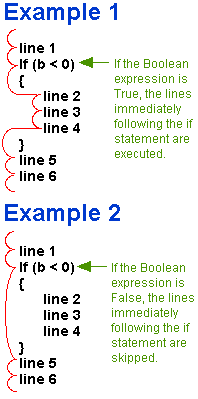 This program accepts a number from the user. It then tests the
number using an if statement to see if it is less than
0. If it is, the program prints a message. Otherwise, the
program is silent. The (b < 0) portion of the program
is the Boolean expression. C evaluates this expression
to decide whether or not to print the message. If the Boolean
expression evaluates to True, then C executes the single line
immediately following the if statement (or a block of lines
within braces immediately following the if statement). If the
Boolean expression is False, then C skips the line or block of
lines immediately following the if statement.
This program accepts a number from the user. It then tests the
number using an if statement to see if it is less than
0. If it is, the program prints a message. Otherwise, the
program is silent. The (b < 0) portion of the program
is the Boolean expression. C evaluates this expression
to decide whether or not to print the message. If the Boolean
expression evaluates to True, then C executes the single line
immediately following the if statement (or a block of lines
within braces immediately following the if statement). If the
Boolean expression is False, then C skips the line or block of
lines immediately following the if statement.
Here's another slightly more complex example:
#include <stdio.h>

int main()
{
    int b;
    printf("Enter a value:");
    scanf("%d", &b);
    if (b < 0)
        printf("The value is negative\n");
    else if (b == 0)
        printf("The value is zero\n");
    else
        printf("The value is positive\n");
    return 0;
}
In this example, else if and else sections
evaluate for zero and positive values as well.
Here is a more complicated Boolean expression:
if ((x==y) && (j>k))
    z=1;
else
    q=10;
This statment says, "if the value in variable x equals the
value in variable y, and if the value in variable j is greater
than the value in variable k, then set the variable z to 1,
otherwise set the variable q to 10." You will use if
statements like this throughout your C programs to make
decisions. In general, most of the decisions you make will be
simple ones like the first example, but on occasion things get
more complicated.
Notice that C uses == to test for equality, while it
uses = to assign a value to a variable. The &&
in C represents a Boolean AND operation. The following chart
shows all boolean operators in C:
  equality          ==
  less than         <
  Greater than      >
  <=                <=
  >=                >=
  inequality        !=
  and               &&
  or                ||
  not               !
= vs. == in Boolean Expressions
The == sign is a problem in C because every now
and then you may forget and type just = in a
Boolean expression. This is an easy mistake to make, but
to the compiler there is a very important difference. C
will accept either = and == in a Boolean
expression - the behavior of the program changes
remarkably between the two, however.
Boolean expressions evaluate to integers in C, and
integers can be used inside of Boolean expressions. The
integer value 0 in C is false, while any other integer
value is true. The following is legal in C:
#include <stdio.h>

int main()
{
    int a;

    printf("Enter a number:");
    scanf("%d", &a);
    if (a)
    {
        printf("The value is True\n");
    }
    return 0;
}
if a is anything other than 0, the printf
statement gets executed.
In C, a statement like if (a=b) means "Assign
b to a, and then test a for its Boolean
value." So if a becomes 0, the if statement
is false; otherwise, it is true. The value of a
changes in the process. This is not the intended behavior
if you meant to type == (although this feature is
useful when used correctly), so be careful with your =
and == usage. |
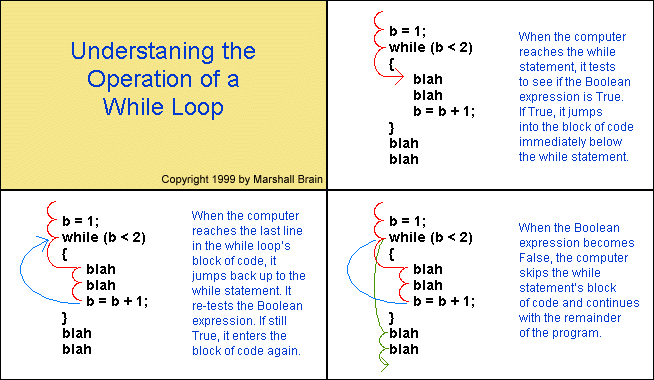
While statements are just as easy to use. For
example:
while (a < b)
{
    printf("%d\n", a);
    a = a + 1;
}
Causes the two lines within the braces to be executed
repeatedly until a is greater than or equal to b.
The while statement in general works like this:
C also provides a "do-while" structure:
do
{
    printf("%d\n", a);
    a = a + 1;
}
while (a < b);
The for loop in C is simply a shorthand way of expressing a
while statement. For example, suppose you have the following
code in C:
x=1;
while (x<10)
{
    blah blah blah
    x++; /* x++ is the same as saying x=x+1 */
}
You can convert this into a for loop as follows:
for(x=1; x<10; x++)
{
    blah blah blah
}
Note that the while loop contains an initialization step (x=1),
a test step (x<10), and an increment step (x++).
The for loop lets you put all three parts onto one line, but
you can put anything into those three parts. For example,
suppose you have the following loop:
a=1;
b=6;
while (a < b)
{
    a++;
    printf("%d\n",a);
}
You can place this into a for statement as well:
for (a=1,b=6; a < b; a++,printf("%d\n",a));
It is slightly confusing, but it is possible. The comma
operator lets you separate several different statements in the
initialization and increment sections of the for loop (but not
in the test section). Many C programmers like to pack a lot of
information into a single line of C code. Many people think it
makes the code harder to understand, so they break it up.
A Real Example!
Let's say that you would like to create a program that
prints a Fahrenheit to Celsius conversion table. This is
easily accomplished with a for loop or a while loop:
#include <stdio.h>

int main()
{
    int a;
    a = 0;
    while (a <= 100)
    {
        printf("%4d degrees F = %4d degrees C\n",
            a, (a - 32) * 5 / 9);
        a = a + 10;
    }
    return 0;
}
If you run this program if will produce a table of values
starting at 0 degrees F and ending at 100 degrees F. The
output will look like this:
   0 degrees F =  -17 degrees C
  10 degrees F =  -12 degrees C
  20 degrees F =   -6 degrees C
  30 degrees F =   -1 degrees C
  40 degrees F =    4 degrees C
  50 degrees F =   10 degrees C
  60 degrees F =   15 degrees C
  70 degrees F =   21 degrees C
  80 degrees F =   26 degrees C
  90 degrees F =   32 degrees C
 100 degrees F =   37 degrees C
The table's values are in increments of 10 degrees. You can
see that you can easily change the starting, ending or
increment values of the table the program produces.
If you wanted your values to be more accurate, you could
use floating point values instead:
#include <stdio.h>

int main()
{
    float a;
    a = 0;
    while (a <= 100)
    {
        printf("%6.2f degrees F = %6.2f degrees C\n",
            a, (a - 32.0) * 5.0 / 9.0);
        a = a + 10;
    }
    return 0;
}
You can see that the declaration for a has been
changed to a float and the %f symbol replaces the %d symbol in
the printf statement. In addition, the %f symbol has some
formatting applied to it: the value will be printed with 6
digits preceeding the decimal point and 2 digits following the
decimal point.
Now let's say that we wanted to modify the program so that
the temperature 98.6 is inserted in the table at the proper
position. That is, we want the table to increment every 10
degrees, but we also want the table to enclude an extra line
for 98.6 degrees F because that is the normal body temperature
for a human being. The following program accomplishes the
goal:
#include <stdio.h>

int main()
{
    float a;
    a = 0;
    while (a <= 100)
    {
	if (a > 98.6)
        {
            printf("%6.2f degrees F = %6.2f degrees C\n",
                98.6, (98.6 - 32.0) * 5.0 / 9.0);
        }
        printf("%6.2f degrees F = %6.2f degrees C\n",
            a, (a - 32.0) * 5.0 / 9.0);
        a = a + 10;
    }
    return 0;
}
This program works if the ending value is 100, but if you
change the ending value to 200 you will find that the program
has a bug. It prints the line for 98.6 degrees too many
times. We can fix that problem in several different ways. Here
is one way:
#include <stdio.h>

int main()
{
    float a, b;
    a = 0;
    b = -1;
    while (a <= 100)
    {
	if ((a > 98.6) && (b < 98.6))
        {
            printf("%6.2f degrees F = %6.2f degrees C\n",
                98.6, (98.6 - 32.0) * 5.0 / 9.0);
        }
        printf("%6.2f degrees F = %6.2f degrees C\n",
            a, (a - 32.0) * 5.0 / 9.0);
        b = a;
        a = a + 10;
    }
    return 0;
}
Try This!
- Try changing the Fahrenheit to Celcius program so that
it uses scanf to accept the starting, ending and increment
value for the table from the user.
- Add a heading line to the table that is produced.
- Try to find a different solution to the bug fixed by the
previous example.
- Create a table that converts pounds to kilograms or
miles to kilometers.
C Errors to avoid
- Putting = when you mean == in an if or while statement.
- Forgetting to increment the counter inside the while
loop. If you forget to increment the counter you get an
infinite loop - the loop never ends.
- Accidentally putting a ; at the end of a for loop
or if statement, so that the statement has no effect. For
example,
for (x=1; x<10; x++);
    printf("%d\n",x);
only prints out one value because the semicolon after the
for statement acts as the one line the for loop
executes.
الدرس التالي |

