|
Strings in C
Strings in C are intertwined with pointers to a large
extent. You must become familiar with the pointer concepts
covered in the previous articles to use C strings effectively.
Once you get used to them, however, you can often perform
string manipulations very efficiently.
A string in C is simply an array of characters. The
following line declares an array that can hold a string of up
to 99 characters.
char str[100];
It holds characters as you would expect: str[0] is
the first character of the string, str[1] is the second
character, and so on. But why is a 100-element array unable to
hold up to 100 characters? Because C uses null-terminated
strings, which means that the end of any string is marked
by the ASCII value 0 (the null character), which is also
represented in C as '\0'.
Null termination is very different from the way many other
languages handle strings. For example, in Pascal, each string
consists of an array of characters, with a length byte that
keeps count of the number of characters stored in the array.
This structure gives Pascal a definite advantage when you ask
for the length of a string. Pascal can simply return the
length byte, whereas C has to count the characters until it
finds '\0'. This fact makes C much slower than Pascal
in certain cases, but in others it makes it faster, as we will
see in the examples below.
Because C provides no explicit support for strings in the
language itself, all of the string-handling functions are
implemented in libraries. The string I/0 operations (gets,
puts, and so on) are implemented in <stdio.h>, and a set of
fairly simple string manipulation functions are implemented in
<string.h> (on some systems, <strings.h> ).
The fact that strings are not native to C forces you to
create some fairly roundabout code. For example, suppose you
want to assign one string to another string; that is, you want
to copy the contents of one string to another. In C, as we saw
in the last article, you cannot simply assign one array to
another. You have to copy it element by element. The string
library (<string.h> or <strings.h> ) contains a function
called strcpy for this task. Here is an extremely
common piece of code to find in a normal C program:
char s[100];
strcpy(s, "hello");
After these two lines execute, the following diagram shows
the contents of s:
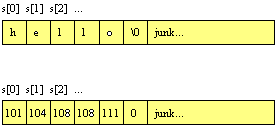
The top diagram shows the array with its characters. The
bottom diagram shows the equivilent ASCII code values for the
characters, and is how C actually thinks about the string (as
an array of bytes containing integer values). See the article entitled
How Bits and
Bytes Work for a discussion of ASCII codes.
strcpy in C:
#include <string.h>
int main()
{
    char s1[100],s2[100];
    strcpy(s1,"hello"); /* copy "hello" into s1 */
    strcpy(s2,s1);      /* copy s1 into s2 */
    return 0;
}
strcpy is used whenever a string is initialized in
C. You use the strcmp function in the string library to
compare two strings. It returns an integer that indicates the
result of the comparison. Zero means the two strings are
equal, a negative value means that s1is less than s2,
and a positive value means s1 is greater than s2.
#include <stdio.h>
#include <string.h>
int main()
{
    char s1[100],s2[100];
     gets(s1);
    gets(s2);
    if (strcmp(s1,s2)==0)
        printf("equal\n");
    else if (strcmp(s1,s2)<0)
        printf("s1 less than s2\n");
    else
        printf("s1 greater than s2\n");
    return 0;
}
Other common functions in the string library include
strlen, which returns the length of a string, and
strcat which concatenates two strings. The string library
contains a number of other functions, which you can peruse by
reading the man page.
To get you started building string functions, and to help
you understand other programmers' code (everyone seems to have
his or her own set of string functions for special purposes in
a program), we will look at two examples, strlen and
strcpy. Following is a strictly Pascal-like version of
strlen:
int strlen(char s[])
{
    int x;
    x=0;
    while (s[x] != '\0')
         x=x+1;
    return(x);
}
Most C programmers shun this approach because it seems
inefficient. Instead, they often use a pointer-based approach:
int strlen(char *s)
{
    int x=0;
    while (*s != '\0')
    {
        x++;
        s++;
    }
    return(x);
}
You can abbreviate this code to the following:
int strlen(char *s)
{
    int x=0;
    while (*s++)
        x++;
    return(x);
}
I imagine a true C expert could make this code even
shorter.
When I compile these three pieces of code on a MicroVAX
with gcc, using no optimization, and run each 20,000 times on
a 120-character string, the first piece of code yields a time
of 12.3 seconds, the second 12.3 seconds, and the third 12.9
seconds. What does this mean? To me, it means that you should
write the code in whatever way is easiest for you to
understand. Pointers generally yield faster code, but the
strlen code above shows that that is not always the case.
We can go through the same evolution with strcpy:
strcpy(char s1[],char s2[])
{
    int x;
    for (x=0; x<=strlen(s2); x++)
        s1[x]=s2[x];
}
Note here that <= is important in the for
loop because the code then copies the '\0'. Be sure to
copy '\0'. Major bugs occur later on if you leave it
out, because the string has no end and therefore an unknown
length. Note also that this code is very inefficient, because
strlen gets called every time through the for
loop. To solve this problem, you could use the following code:
strcpy(char s1[],char s2[])
{
    int x,len;
     len=strlen(s2);
    for (x=0; x<=len; x++)
        s1[x]=s2[x];
}
The pointer version is similar.
strcpy(char *s1,char *s2)
{
    while (*s2 != '\0')
    {
        *s1 = *s2;
        s1++;
        s2++;
    }
}
You can compress this code further:
strcpy(char *s1,char *s2)
{
    while (*s2)
        *s1++ = *s2++;
}
If you wish, you can even say while (*s1++ = *s2++);.
The first version of strcpy takes 415 seconds to copy a
120-character string 10,000 times, the second version takes
14.5 seconds, the third version 9.8 seconds, and the fourth
10.3 seconds. As you can see, pointers provide a significant
performance boost here.
The prototype for the strcpy function in the string
library indicates that it is designed to return a pointer to a
string:
char *strcpy(char *s1,char *s2)
Most of the string functions return a string pointer as a
result, and strcpy returns the value of s1 as
its result.
Using pointers with strings can sometimes result in
definite improvements in speed and you can take advantage of
these if you think about them a little. For example, suppose
you want to remove the leading blanks from a string. You might
be inclined to shift characters over on top of the blanks to
remove them. In C, you can avoid the movement altogether:
#include <stdio.h>
#include <string.h>

int main()
{
    char s[100],*p;
     gets(s);
    p=s;
    while (*p==' ')
        p++;
    printf("%s\n",p);
    return 0;
}
This is much faster than the movement technique, especially
for long strings.
You will pick up many other tricks with strings as you go
along and read other code. Practice is the key.
A Special Note on String Constants
Suppose you create the following two code fragments and run
them:
Fragment 1

{
    char *s;

    s="hello";
    printf("%s\n",s);
}

Fragment 2

{
    char s[100];

    strcpy(s,"hello");
    printf("%s\n",s);
}
These two fragments produce the same output, but their
internal behavior is quite different. In fragment 2, you
cannot say s="hello"; . To understand the differences,
you have to understand how the string constant table
works in C.
When your program is compiled, the compiler forms the
object code file, which contains your machine code and a table
of all the string constants declared in the program. In
fragment 1, the statement s="hello"; causes s to
point to the address of the string hello in the string
constant table. Since this string is in the string constant
table, and therefore technically a part of the executable
code, you cannot modify it. You can only point to it and use
it in a read-only manner.
In fragment 2, the string hello also exists in the
constant table, so you can copy it into the array of
characters named s. Since s is not a pointer, the
statement s="hello"; will not work in fragment 2. It
will not even compile.
A Special Note on Using Strings with malloc
Suppose you write the following program:
int main()
{
    char *s;

    s=(char *) malloc (100);
    s="hello";
    free(s);
    return 0;
}
It compiles properly, but gives a segmentation fault at the
free line when you run it. The malloc line
allocates a block 100 bytes long and points s at it, but now
the s="hello"; line is a problem. It is syntactically
correct because s is a pointer; however, when s="hello";
is executed, s points to the string in the string constant
table and the allocated block is orphaned. Since s is pointing
into the string constant table, the string cannot be changed;
free fails because it cannot deallocate a block in an
executable region.
The correct code follows:
int main()
{
    char *s;
    s=(char *) malloc (100);
    strcpy(s,"hello");
    free(s);
    return 0;
}
C Error to Avoid
Losing the \0 character, which is easy if you aren't
careful, and can lead to some very subtle bugs. Make sure you
copy \0 when you copy strings. If you create a new string,
make sure you put \0 in it. And if you copy one string to
another, make sure the receiving string is big enough to hold
the source string, including \0. Finally, if you point a
character pointer to some characters, make sure they end with
\0.
Exercises
- Create a program that reads in a string containing a
first name followed by a blank followed by a last name.
Write functions to remove any leading or trailing blanks.
Write another function that returns the last name.
- Write a function that converts a string to uppercase.
- Write a function that gets the first word from a string
and returns the remainder of the string.
Operator Precedence in C
C contains many operators, and because of the way in which
operator precedence works, the interactions between multiple
operators can become confusing.
x=5+3*6;
X receives the value 23, not 48, because in C
multiplication and division have higher precedence than
addition and subtraction.
char *a[10];
Is a a single pointer to an array of 10 characters,
or is it an array of 10 pointers to character? Unless you know
the precedence conventions in C, there is no way to find out.
Similarly, in E.11 we saw that because of precedence
statements such as *p.i = 10; do not work. Instead, the
form (*p).i = 10; must be used to force correct
precedence.
The following table from Kernigan and Richie shows the
precedence hierarchy in C. The top line has the highest
precedence.
Operators                                  Associativity
( [ - .                                    Left to right
! - ++  -{-  + *  &  (type-cast)  sizeof   Right to left
(in the above line, +, - and * are the unary forms)
*  / %                                     Left to right
+  -                                       Left to right
<<  >>                                     Left to right
<  <=  >  >=                               Left to right
==  !=                                     Left to right
&                                          Left to right
^                                          Left to right
|                                          Left to right
&&                                         Left to right
||                                         Left to right
?:                                         Left to right
=  +=  -=  *=  /=  %=  &=  ^=  |=  <<= >>= Right to left
,                                          Left to right
Using this table, you can see that char *a[10]; is
an array of 10 pointers to character. You can also see why the
parentheses are required if (*p).i is to be handled
correctly. After some practice, you will memorize most of this
table, but every now and again something will not work because
you have been caught by a subtle precedence problem.
Command Line Arguments in C
C provides a fairly simple mechanism for retrieving command
line parameters entered by the user. It passes an argv
parameter to the main function in the program. argv
structures appear in a fair number of the more advanced
library calls, so understanding them is useful to any C
programmer.
Enter the following code and compile it:
#include <stdio.h>

int main(int argc, char *argv[])
{
    int x;

    printf("%d\n",argc);
    for (x=0; x<argc; x++)
        printf("%s\n",argv[x]);
    return 0;
}
In this code, the main program accepts two parameters, argv
and argc. The argv parameter is an array of pointers to string
that contains the parameters entered when the program was
invoked at the UNIX command line. The argc integer contains a
count of the number of parameters. This particular piece of
code types out the command line parameters. To try this,
compile the code to an executable file named aaa and
type aaa xxx yyy zzz. The code will print the command
line parameters xxx, yyy and zzz, one per line.
The char *argv[] line is an array of pointers to
string. In other words, each element of the array is a
pointer, and each pointer points to a string (technically, to
the first character of the string). Thus, argv[0]
points to a string that contains the first parameter on the
command line (the program's name), argv[1] points to
the next parameter, and so on. The argc variable tells you how
many of the pointers in the array are valid. You will find
that the preceding code does nothing more than print each of
the valid strings pointed to by argv.
Because argv exists, you can let your program react to
command line parameters entered by the user fairly easily. For
example, you might have your program detect the word help
as the first parameter following the program name, and dump a
help file to stdout. File names can also be passed in and used
in your fopen statements.
Binary Files in C
Binary files are very similar to arrays of structures,
except the structures are in a disk file rather than in an
array in memory. Because the structures in a binary file are
on disk, you can create very large collections of them
(limited only by your available disk space). They are also
permanent and always available. The only disadvantage is the
slowness that comes from disk access time.
Binary files have two features that distinguish them from
text files: You can jump instantly to any structure in the
file, which provides random access as in an array; and you can
change the contents of a structure anywhere in the file at any
time. Binary files also usually have faster read and write
times than text files, because a binary image of the record is
stored directly from memory to disk (or vice versa). In a text
file, everything has to be converted back and forth to text,
and this takes time.
C supports the file-of-structures concept very cleanly.
Once you open the file you can read a structure, write a
structure, or seek to any structure in the file. This file
concept supports the concept of a file pointer. When
the file is opened, the pointer points to record 0 (the first
record in the file). Any read operation reads the currently
pointed-to structure and moves the pointer down one structure.
Any write operation writes to the currently pointed-to
structure and moves the pointer down one structure. Seek moves
the pointer to the requested record.
Keep in mind that C thinks of everything in the disk file
as blocks of bytes read from disk into memory or read from
memory onto disk. C uses a file pointer, but it can point to
any byte location in the file. You therefore have to keep
track of things.
The following program illustrates these concepts:
#include <stdio.h>

/* random record description - could be anything */
struct rec
{
    int x,y,z;
};

/* writes and then reads 10 arbitrary records
   from the file "junk". */
int main()
{
    int i,j;
    FILE *f;
    struct rec r;

    /* create the file of 10 records */
    f=fopen("junk","w");
    if (!f)
        return 1;
    for (i=1;i<=10; i++)
    {
        r.x=i;
        fwrite(&r,sizeof(struct rec),1,f);
    }
    fclose(f);

    /* read the 10 records */
    f=fopen("junk","r");
    if (!f)
        return 1;
    for (i=1;i<=10; i++)
    {
        fread(&r,sizeof(struct rec),1,f);
        printf("%d\n",r.x);
    }
    fclose(f);
    printf("\n");

    /* use fseek to read the 10 records
       in reverse order */
    f=fopen("junk","r");
    if (!f)
        return 1;
    for (i=9; i>=0; i--)
    {
        fseek(f,sizeof(struct rec)*i,SEEK_SET);
        fread(&r,sizeof(struct rec),1,f);
        printf("%d\n",r.x);
    }
    fclose(f);
    printf("\n");

    /* use fseek to read every other record */
    f=fopen("junk","r");
    if (!f)
        return 1;
    fseek(f,0,SEEK_SET);
    for (i=0;i<5; i++)
    {
        fread(&r,sizeof(struct rec),1,f);
        printf("%d\n",r.x);
        fseek(f,sizeof(struct rec),SEEK_CUR);
    }
    fclose(f);
    printf("\n");

    /* use fseek to read 4th record,
       change it, and write it back */
    f=fopen("junk","r+");
    if (!f)
        return 1;
    fseek(f,sizeof(struct rec)*3,SEEK_SET);
    fread(&r,sizeof(struct rec),1,f);
    r.x=100;
    fseek(f,sizeof(struct rec)*3,SEEK_SET);
    fwrite(&r,sizeof(struct rec),1,f);
    fclose(f);
    printf("\n");

    /* read the 10 records to insure
       4th record was changed */
    f=fopen("junk","r");
    if (!f)
        return 1;
    for (i=1;i<=10; i++)
    {
        fread(&r,sizeof(struct rec),1,f);
        printf("%d\n",r.x);
    }
    fclose(f);
    return 0;
}
In this program, a structure description rec has
been used, but you can use any structure description you want.
You can see that fopen and fclose work exactly
as they did for text files.
The new functions here are fread, fwrite and fseek. The
fread function takes four parameters: a memory address, the
number of bytes to read per block, the number of blocks to
read, and the file variable. Thus, the line
fread(&r,sizeof(struct rec),1,f); says to read 12 bytes
(the size of rec) from the file f (from the
current location of the file pointer) into memory address
&r. One block of 12 bytes is requested. It would be just
as easy to read 100 blocks from disk into an array in memory
by changing 1 to 100.
The fwrite function works the same way, but moves
the block of bytes from memory to the file. The fseek
function moves the file pointer to a byte in the file.
Generally, you move the pointer in sizeof(struct rec)
increments to keep the pointer at record boundaries. You can
use three options when seeking: SEEK_SET, SEEK_CUR and
SEEK_END. SEEK_SET moves the pointer x bytes down from
the beginning of the file (from byte 0 in the file). SEEK_CUR
moves the pointer x bytes down from the current pointer
position. SEEK_END moves the pointer from the end of the file
(so you must use negative offsets with this option).
Several different options appear in the code above. In
particular, note the section where the file is opened with
r+ mode. This opens the file for reading and writing,
which allows records to be changed. The code seeks to a
record, reads it, and changes a field; it then seeks back
because the read displaced the pointer, and writes the change
back.
والآن بعد هذه الجولة الطويلة نتمنى أن تكون قد استفدت واستمتعت
في رحلتك مع لغة سي الرائعة.
عودة إلى الصفحة الرئيسية |

