|
Pointers in C
Pointers are used everywhere in C, so if you want to use
the C language fully you have to have a very good
understanding of pointers. They have to become comfortable
for you. The goal of this section and the next several that
follow is to help you build a complete understanding of
pointers and how C uses them. For most people it takes a
little time and some practice to become fully comfortable with
pointers, but once you master them you are a full-fledged C
programmer.
C uses pointers in three different ways:
- C uses pointers to create dynamic data structures:
data structures built up from blocks of memory allocated
from the heap at run-time.
- C uses pointers to handle variable parameters
passed to functions.
- Pointers in C provide an alternative way to access
information stored in arrays. Pointer techniques are
especially valuable when you work with strings. There is an
intimate link between arrays and pointers in C.
In some cases, C programmers also use pointers because they
make the code slightly more efficient. What you will find is
that, once you are completely comfortable with pointers, you
tend to use them all the time.
We will start this discussion with a basic introduction to
pointers and the concepts surrounding pointers, and then move
on to the three techniques described above. Especially on this
article, you will want to read things twice. The first time
through you can learn all the concepts. The second time
through you can work on binding the concepts together into an
integrated whole in your mind. After you make your way through
the material the second time, it will make a lot of sense.
Why Use Pointers?
Imagine that you would like to create a text editor - a
program that lets you edit normal ASCII text files, like "vi"
on UNIX or "Notepad" on Windows. A text editor is a fairly
common thing for someone to create because, if you think about
it, a text editor is probably a programmer's most commonly
used piece of software. The text editor is a programmer's
intimate link to the computer - it is where you enter all of
your thoughts and then manipulate them. Obviously, with
anything you use that often and work with that closely, you
want it to be just right. Therefore many programmers create
thier own editors and customize them to suit their individual
working styles and preferences.
So one day you sit down to begin working on your editor.
After thinking about the features you want, you begin to think
about the "data structure" for your editor. That is, you begin
thinking about how you will store the document you are editing
in memory so that you can manipulate it in your program. What
you need is a way to store the information you are entering in
a form that can be maniulated quickly and easily. You believe
that one way to do that is to organize the data on the basis
of lines of characters. Give what we have discussed so far,
the only thing you have at your disposal at this point is an
array. You think, "well, a typical line is 80 characters long,
and a typical file is no more than 1,000 lines long." You
therefore declare a two-dimensional array like this:
char doc[1000][80];
This declaration requests an array of 1,000
eighty-character lines. This array has a total size of 80,000
characters.
As you think about your editor and its data structure some
more, however, you realize three things:
- Some documents are long lists. Every line is short, but
there are thousands of lines.
- Some special-purpose text files have very long lines.
For example, a certain data file might have lines containing
542 characters, with each character representing the amino
acid pairs in segments of DNA.
- In most modern editors you can open multiple files at
one time.
Let's say you set a maximum of 10 open files at once, a
maximum line length of 1,000 characters and a maximum file
size of 50,000 lines. Your declaraction now looks like this:
char doc[50000][1000][10];
That doesn't seem like an unreasonable thing, until you
pull out your calculator, multiply 50,000 by 1,000 by 10 and
realize the array contains 500 million characters! Most
computers today are going to have a problem with an array that
size. They simply do not have the RAM, or even the virtual
memory space, to support an array that large. If users were to
try to run three or four copies of this program simultaneously
on even the largest multi-user system, it would put a severe
strain on the facilities.
Even if the computer would accept a request for such a
large array, you can see that it is an extravagant waste of
space. It seems strange to declare a 500 million character
array when, in the vast majority of cases, you will run this
editor to look at 100 line files that consume at most 4,000 or
5,000 bytes. The problem with an array is the fact that you
have to declare it to have its maximum size in every dimension
from the beginning. Those maximum sizes often multiply
together to form very large numbers. Also, if you happen to
need to be able to edit an odd file with a 2,000 character
line in it, you are out of luck. There is really no way for
you to predict and handle the maximum line length of a text
file, because, technically, that number is infinite.
Pointers are designed to solve this problem. With pointers,
you can create dynamic data structures. Instead of
declaring your worst-case memory consumption up front in an
array, you instead allocate memory from the heap
while the program is running. That way you can use the exact
amount of memory a document needs, with no waste. In addition,
when you close a document you can return the memory to the
heap so that other parts of the program can use it. With
pointers, memory can be recycled while the program is running.
By the way, if you read the previous discussion and one of
the big questions you have is, "What IS a byte, really?", then
this article entitled
How Bits and
Bytes Work will help you understand the concepts, as well
as things like "mega", "giga" and "tera". Go take a look and
then come back.
Pointer Basics
To understand pointers, it helps to compare them to normal
variables.
A "normal variable" is a location in memory that can hold a
value. For example, when you declare a variable i as an
integer, four bytes of memory are set aside for it. In your
program, you refer to that location in memory by the name i.
At the machine level that location has a memory address. The
four bytes at that address are known to you, the programmer,
as i, and the four bytes can hold one integer value.
A pointer is different. A pointer is a variable that
points to another variable. This means that a pointer
holds the memory address of another variable. Put another way,
the pointer does not hold a value in the traditional sense;
instead, it holds the address of another variable. A pointer
"points to" that other variable by holding a copy of its
address.
Because a pointer holds an address rather than a value, it
has two parts. The pointer itself holds the address. That
address points to a value. There is the pointer and the value
pointed to. This fact can be a little confusing until you get
comfortable with it, but once you get comfortable it becomes
extremely powerful.
The following example code shows a typical pointer:
#include <stdio.h>

int main()
{
    int i,j;
    int *p;   /* a pointer to an integer */
    p = &i;
    *p=5;
    j=i;
    printf("%d %d %d\n", i, j, *p);
    return 0;
}
The first declaration in this program declares two normal
integer varibales named i and j. The line int
*p declares a pointer named p. This line asks the
compiler to declare a variable p that is a pointer
to an integer. The * indicates that a pointer is being
declared rather than a normal variable. You can create a
pointer to anything: a float, a structure, a char, and so on.
Just use a * to indicate that you want a pointer rather
than a normal variable.
The line p = &i; will definitely be new to you. In
C, & is called the address operator. The
expression &i means "the memory address of the variable
i." Thus, the expression p = &i; means "Assign
to p the address of i." Once you execute this
statement, p "points to" i. Before you do so,
p contains a random, unknown address, and its use will
likely cause a segmentation fault or similar program crash.
One good way to visualize what is happening is to draw a
picture. After i, j and p are declared,
the world looks like this:
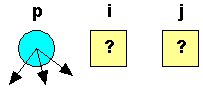
In this drawing the three variables i, j and
p have been declared, but none of the three has been
initialized. The two integer variables are therefore drawn as
boxes containing question marks - they could contain any value
at this point in the program's execution. The pointer is drawn
as a circle to distinguish it from a normal variable that
holds a value, and the random arrows indicate that it can be
pointing anywhere at this moment.
After the line p = &I;, p is initialized and
it points to i, like this:
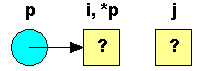
Once p points to i, the memory location i
has two names. It is still known as i, but now it is
known as *p as well. This is how C talks about the two
parts of a pointer variable: p is the location holding
the address, while *p is the location pointed to by
that address. Therefore *p=5 means that the location
pointed to by p should be set to 5, like this:
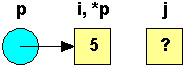
Because the location *p is also i, i
also takes on the value 5. Consequently, j=i; sets j
to 5, and the printf statement produces 5 5 5.
The main feature of a pointer is its two-part nature. The
pointer itself holds an address. The pointer also points to a
value of a specific type - the value at the address the point
holds. The pointer iself, in this case, is p. The value
pointed to is *p.
Understanding Memory Addresses
The previous discussion becomes a little clearer if you
understand how memory addresses work in a computer's hardware.
If you have not read it already, now would be a good time to
read the article entitled
How Bits and
Bytes Work to fully understand bits, bytes and words.
All computers have memory, also known as RAM
or Random Access Memory. For example, your computer
might have 16 or 32 or 64 megabytes of RAM installed right
now. RAM holds the programs that your computer is currently
running along with the data they are currently manipulating
(their variables and data structures). Memory can be thought
of simply as an array of bytes. In this array, every memory
location has its own address--the address of the first byte is
0, followed by 1, 2, 3,.... Memory addresses act just like the
indexes of a normal array. The computer can access any address
in memory at any time (hence the name Random Access Memory).
It can also group bytes together as it needs to to form larger
variables, arrays, and structures. For example, a floating
point variable consumes four contiguous bytes in memory. You
might make the following global declaration in a program:
float f;
This statement says, "declare a location named f
that can hold one floating point value." When the program
runs, the computer reserves space for the variable f
somewhere in memory. That location has a fixed address in the
memory space, like this:
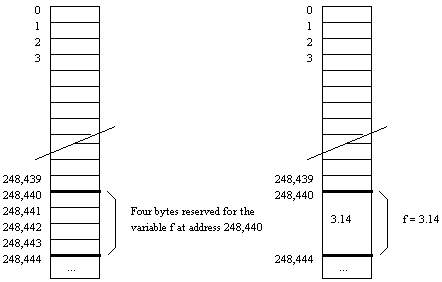
The variable f consumes four bytes of RAM in
memory.
That location has a specific address, in this case 248,440.
While you think of the variable f, the computer
thinks of a specific address in memory (for example, 248,440).
Therefore, when you create a statement like this:
f = 3.14;
The compiler might translate that into, "load the value
3.14 into memory location 248,440". The computer is always
thinking of memory in terms of addresses and values at those
addresses.
There are, by the way, several interesting side effects to
the way your computer treats memory. For example, say that you
include the following code in one of your programs:
int i, s[4], t[4], u=0;

for (i=0; i<=4; i++)
{
	s[i] = i;
	t[i] =i;
}
Printf("s:t\n");
for (i=0; i<=4; i++)
	printf("%d:%d\n", s[i], t[i]);
printf("u = %d\n", u);
The output that you see from the program will probably look
like this:
s:t
1:5
2:2
3:3
4:4
5:5
u = 5
Why are t[0] and u incorrect? If you look carefully at the
code, you can see that the for loops are writing one element
past the end of each array. In memory, the arrays are placed
adjacent to one another, as shown here:
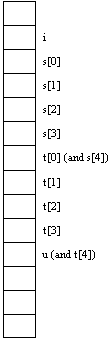
Therefore, when you try to write to s[4], which does not
exist, the system writes into t[0] instead because t[0] is
where s[4] ought to be. When you write into t[4], you are
really writing into u. As far as the computer is concerned,
s[4] is simply an address, and it can write into it. As you
can see however, even though the computer executes , the
program, it is not correct or valid. The program corrupts the
array t in the process of running. If you execute the
following statement, move severe consequences result:
s[1000000] = 5;
The location s[1000000] is more than likely outside of your
program's memory space. In other words, you are writing into
memory that your program does not own. On a system with
protected memory spaces (UNIX, Windows 98/NT), this sort of
statement will cause the system to terminate execution of the
program. On other systems (Windows 3.1, the Mac), however, the
system is not aware of what you are doing. You end up damaging
the code or variables in another application. The effect of
the violation can range from nothing at all to a complete
system crash. In memory, i, s, t and u are all placed next to
one another at specific addresses. Therefore, if you write
past the boundaries of a variable, the computer will do what
you say but it will end up corrupting another memory location.
Because C and C++ do not perform any sort of range checking
when you access an element of an array, it is essential that
you, as a programmer, pay careful attention to array ranges
yourself and keep within the array's appropriate boundaries.
Unintentionally reading or writing outside of array boundaries
always leads to faulty program behavior.
As another example, try the following:
#include <stdio.h>

int main()
{
    int i,j;
    int *p;   /* a pointer to an integer */
    printf("%d %d\n", p, &i);
    p = &i;
    printf("%d %d\n", p, &i);
    return 0;
}
This code tells the compiler to print out the address held
in p, along with the address of i.
The variable p starts off with some crazy value or with
0. The address of i is generally a large value. For
example, when I ran this code, I received the following
output:
0   2147478276
2147478276   2147478276
which means that the address of i is 2147478276.
Once the statement p = &i; has been executed, p
contains the address of i. Try this as well:
#include <stdio.h>

void main()
{
    int *p;   /* a pointer to an integer */

    printf("%d\n",*p);
}
This code tells the compiler to print the value p
points to. However, p has not been initialized yet; it
contains the address 0 or some random address. In most cases a
segmentation fault (or some other run-time error) results,
which means that you have used a pointer that points to an
invalid area of memory. Almost always, an uninitialized
pointer or a bad pointer address is the cause of segmentation
faults.
Having said all of this, we can now look at pointers in a
whole new light. Take this program, for example:
#include <stdio.h>

int main()
{
    int i;
    int *p;   /* a pointer to an integer */
    p = &i;
    *p=5;
    printf("%d %d %d\n", i, *p);
    return 0;
}
Here is what's happening:
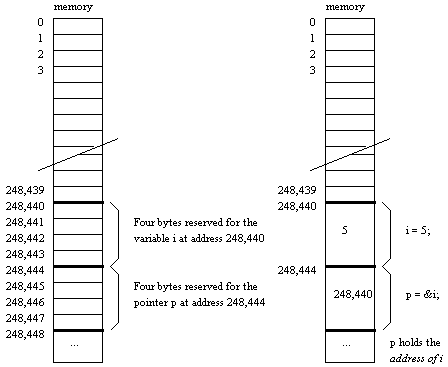
The variable i consumes four bytes of memory. The
pointer p also consumes four bytes (on most machines in use
today, a pointer consumes four bytes of memory. Memory
addresses are 32-bits long on most CPUs today, although there
is a trend toward 64-bit addressing building right now). The
location of i has a specific address, in this case 248,440.
The pointer p holds that address once you say p = &i;.
The variables *p and i are therefore equivilent.
The pointer p literally holds the address of i. When
you say something like this in a program:
printf("%d", p);
what comes out is the actual address of the variable i.
Here is one other fun fact: any number of pointers can
point to the same address. For example, you could declare p,
q, and r as integer pointers and set all of them to point to
i as shown here:
int i;
int *p, *q, *r;

p = &i;
q = &i;
r = p;
Note that in this code, r points to the same thing that p
points to, which is i. You can assign pointers to one
another, and the address is copied from the right hand side to
the left hand side during the assignment. After executing the
above code, the following picture shows how things would look:
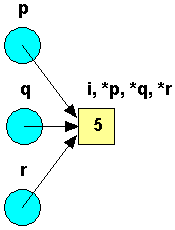
The variable i now has four names: i, *p, *q and *r. There
is no limit on the number of pointers that can hold, and
therefore point to, the same address.
C Errors to Avoid
Bug #1 - Uninitialized pointers
One of the easiest ways to create a pointer bug is to try
to reference the value of a pointer even though the pointer is
uninitialized and does not yet point to a valid address. For
example:
	int *p;

	*p = 12;
The pointer p is uninitialized and points to a
random location in memory when you declare it. It could be
pointing into the system stack, or the global variables, or
into the program's code space, or into the operating system.
When you say *p=12;, the program will simply try to
write a 12 to whatever random location p points to. The
program may explode immediately, or may wait half an hour and
then explode, or it may subtly corrupt data in another part of
your program and you may never realize it. This can make this
error very hard to track down. Make sure you initialize all
pointers to a valid address before dereferncing them.
Bug #2 - Invalid Pointer References
An invalid pointer reference occurs when a pointer's value
is referenced even though the pointer doesn't point to a valid
block.
One way to create this error is to say p=q;, when
q is uninitialized. The pointer p will then become
uninitialized as well, and any reference to *p is an invalid
pointer reference.
The only way to avoid this bug is to draw pictures of each
step of the program and make sure that all pointers point
somewhere. Invalid pointer references cause a program to crash
inexplicably for the same reasons given in Bug #1.
Bug #3 - Zero Pointer Reference
A zero pointer reference occurs whenever a pointer pointing
to zero is used in a statement that attempts to reference a
block. For example, if p is a pointer to an integer,
the following code is invalid:
p = 0;
*p = 12;
There is no block pointed to by p. Therefore, trying to
read or write anything from or to that block is an invalid
zero pointer reference. There are good, valid reasons to point
a pointer to zero, as we will see in later articles.
Dereferencing such a pointer, however, is invalid.
All of these bugs are fatal to a program that contains
them. You must watch your code so that these bugs do not
occur. The best way to do that is to draw pictures of the
code's execution step by step.
Using Pointers for Function
Parameters in C
Most C programmers first use pointers to implement
something called variable parameters in functions. You
have actually been using variable parameters in the scanf
function - that's why your've had to use the & (the
address operator) on variables used with scanf. Now that you
understand pointers you can see what has reall been going on.
To understand how variable parameters work, lets see how we
might go about implementing a "swap" function in C. To
implement a swap function, what you would like to do is pass
in 2 variables and have the function swap their values. Here's
one attempt at an implementation - enter and execute the
following code and see what happens:
#include <stdio.h>

void swap(int i, int j)
{
    int t;

    t=i;
    i=j;
    j=t;
}

void main()
{
    int a,b;

    a=5;
    b=10;
    printf("%d %d\n", a, b);
    swap(a,b);
    printf("%d %d\n", a, b);
}
When you execute this program, you will find that no
swapping takes place. The values of a and b are
passed to swap, and the swap function does swap them, but when
the function returns nothing happens.
To make this function work correctly you can use pointers,
as shown below:
#include <stdio.h>

void swap(int *i, int *j)
{
    int t;
    t = *i;
    *i = *j;
    *j = t;
}

void main()
{
    int a,b;
    a=5;
    b=10;
    printf("%d %d\n",a,b);
    swap(&a,&b);
    printf("%d %d\n",a,b);
}
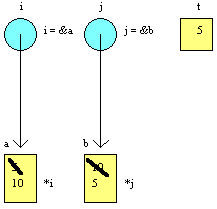
To get an idea of what this code does, print it out, draw
the two integers a and b, and enter 5 and 10 in
them. Now draw the two pointers i and j, along
with the integer t. When swap is called, it is
passed the addresses of a and b. Thus,
i points to a (draw an arrow from i to a)
and j points to b (draw another arrow from b
to j). Once the pointers are initialized by the
function call, *i is another name for a, and
*j is another name for b. Now run the code in
swap. When the code uses *i and *j, it
really means a and b. When the function
completes, a and b have been swapped.
Suppose you accidentally forget the & when the
swap function is called, and that the swap line
accidentally looks like this: swap(a, b);. This causes
a segmentation fault. When you leave out the &, the
value of a is passed instead of its address.
Therefore, i points to an invalid location in memory
and the system crashes when *i is used.
This is also why scanf crashes if you forget the
& on variables passed to it. The scanf function is
using pointers to put the value it reads back into the
variable you have passed. Without the &, scanf
is passed a bad address and crashes.
Variable parameters are one of the most common uses of
pointers in C. Now you understand what's happening!
Dynamic Data Structures in C
Dynamic data structures are data structures that grow and
shrink as you need them to by allocating and deallocating
memory from a place called the heap. They are extremely
important in C because they allow the programmer to exactly
control memory consumption.
Dynamic data structures allocate blocks of memory from the
heap as required, and link those blocks together into some
kind of data structure using pointers. When the data structure
no longer needs a block of memory, it will return the block to
the heap for reuse. This recycling makes very efficient use of
memory.
To understand dynamic data structures completely, we need
to start with the heap.
How the Heap Works
A typical personal computer or workstation today has
somewhere between 16 and 64 megabytes of RAM installed. Using
a technique called virtual memory, the system can swap
pieces of memory on and off the machine's hard disk to create
an illusion for the CPU that it has much more memory, for
example 200 to 500 megabytes. While this illusion is complete
as far as the CPU is concerned, it can sometimes slow things
down tremendously from the user's perspective. Despite this
drawback, virtual memory is an extremely useful technique for
"increasing" the amount of RAM in a machine in an inexpensive
way. Let's assume for the sake of this discussion that a
typical computer has a total memory space of, for example, 50
megabytes (regardless of whether that memory is implemented in
real RAM or in virtual memory).
The operating system on the machine is in charge of the 50
megabyte memory space. The operating system uses the space in
several different ways, as shown here:
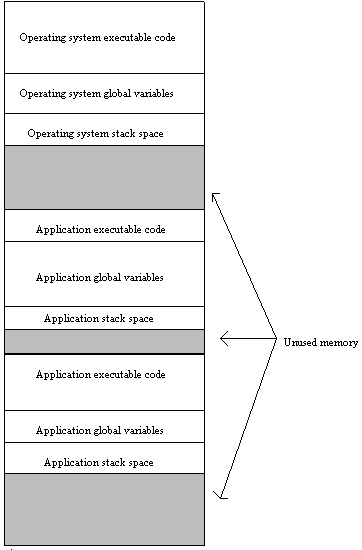
The operating system and several applications,
along with their global variables and stack spaces, all
consume portions of memory. When a program completes
execution, it releases its memory for reuse by other programs.
Note that part of the memory space remains unused at any given
time.
This is, of course, an idealization, but the basic
principles are correct. As you can see, memory holds the
executable code for the different applications currently
running on the machine, along with the executable code for the
operating system itself. Each application has certain global
variables associated with it. These variables also consume
memory. Finally, each application uses an area of memory
called "the stack", which holds all local variables and
parameters used by any function. The stack also remembers the
order in which functions are called so that function returns
occur correctly. Each time a function is called, its local
variables and parameters are "pushed onto" the stack. When the
function returns, these locals and parameters are "popped".
Because of this, the size of a program's stack fluctuates
constantly as the program is running but it has some maximum
size.
As a program finishes execution, the operating system
unloads it, its globals and its stack space from memory. A new
program can make use of that space at a later time. In this
way, the memory in a computer system is constantly "recycled"
and reused by programs as they execute and complete.
In general, perhaps 50% of the computer's total memory
space might be unused at any given moment. The operating
system owns and manages the unused memory, and it is
collectively known as the heap. The heap is extremely
important because it is available for use by applications
during execution using the C functions malloc (memory
allocate) and free. The heap allows programs to
allocate memory exactly when they need it during the execution
of a program, rather than pre-allocating it with a
specifically-sized array declaration.
How malloc and free work
Let's say that you would like to allocate a certain amount
of memory during the execution of your application. You can
call the malloc function at any time, and it will request a
block of memory from the heap. The operating system will
reserve a block of memory for your program, and you can use it
in any way you like. When you are done with the block, you
return it to the operating system for recycling by calling the
free function. Then other applications can reserve it later
for their own use.
For example, the following code demonstrates the simplest
possible use of the heap:
int main()
{
	int *p;

	p = (int *)malloc(sizeof(int));
	if (p == 0)
	{
		printf("ERROR: Out of memory\n");
		return 1;
	}
	*p = 5;
	printf("&d\n", *p);
	free(p);
	return 0;
}
The first line in this program calls the malloc function.
This function does three things:
- The malloc statement first looks at the amount of memory
available on the heap and asks, "Is there enough memory
available to allocate a block of memory of the size
requested?" The amount of memory needed for the block is
known from the parameter passed into malloc - in this case,
sizeof(int) is 4 bytes. If there is not enough memory
available, the malloc function returns the address zero to
indicate the error (another name for zero is NULL and you
will see it used throughtout C code). Otherwise malloc
proceeds.
- If memory is available on the heap, the system
"allocates" or "reserves" a block from the heap of the size
specified. The system reserves the block of memory so that
it isn't accidentally used by more than one malloc
statement.
- The system then places into the pointer variable (p in
this case) the address of the reserved block. The pointer
variable itself contains an address. The allocated block is
able to hold a value of the type specified, and the pointer
points to it.
The following diagram shows the state of memory after
calling malloc:
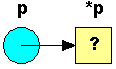
The block on the right is the block of memory
malloc allocated.
The program next checks the pointer p to make sure that the
allocation request succeeded with the line if (p == 0)
(which could have also been written as if (p == NULL)
or even if (!p). If the allocation fails (if p is
zero), the program terminates. If the allocation is
successful, the program then initializes the block to the
value 5, prints out the value, and calls the free function to
return the memory to the heap before the program terminates.
There is really no difference between this code and
previous code that sets p equal to the address of an existing
integer i. The only distinction is that, in the case of the
variable i, the memory existed as part of the program's
pre-allocated memory space and had the two names: i and
*p. In the case of memory allocated from the heap, the
block has the single name *p and is allocated during
the program's execution. Two common questions:
- Is it really important to check that the pointer is zero
after each allocation? Yes. Since the heap varies in size
constantly depending on which programs are running, how much
memory they have allocated, etc., there is never any
guarantee that a call to malloc will succeed. You should
check the pointer after any call to malloc to make sure the
pointer is valid.
- What happens if I forget to delete a block of memory
before the program terminates? When a program terminates,
the operating system "cleans up after it", releasing its
executable code space, stack, global memory space and any
heap allocations for recycling. Therefore, there are no
long-term consequences to leaving allocations pending at
program termination. However, it is considered bad form, and
"memory leaks" during the execution of a program are
harmful, as discussed below.
The following two programs show two different valid uses of
pointers, and try to distinguish between the use of a pointer
and of the pointer's value:
void main()
{
	int *p, *q;

	p = (int *)malloc(sizeof(int));
	q = p;
	*p = 10;
	printf("%d\n", *q);
	*q = 20;
	printf("%d\n", *q);
}
The final output of this code would be 10 from line 4 and
20 from line 6. Here's a diagram:
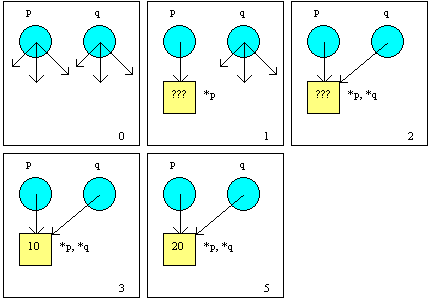
The following code is slightly different:
void main()
{
	int *p, *q;

	p = (int *)malloc(sizeof(int));
	q = (int *)malloc(sizeof(int));
	*p = 10;
	*q = 20;
	*p = *q;
	printf("%d\n", *p);
}
The final output from this code would be 20 from line 6.
Here's a diagram:
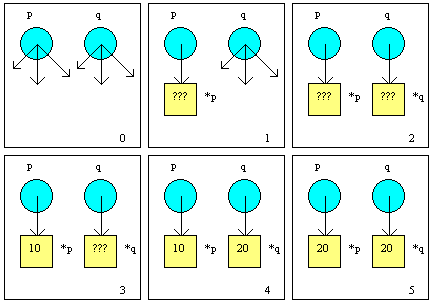
Notice that the compiler will allow *p = *q, because
*p and *q are both integers. This statement says, "Move the
integer value pointed to by q into the integer value pointed
to by p". The statement moves the values. The compiler will
also allow p = q, because p and q are both pointers,
and both point to the same type (if s is a pointer to a
character, p = s is not allowed because they point to
different types). The statement p = q says, "Point p to
the same block q points to". In other words, the address
pointed to by q is moved into p, so they both point to the
same block. This statement moves the addresses.
From all of these examples, you can see that there are four
different ways to initialize a pointer. When a pointer is
declared, as in int *p, it starts out in the program in
an uninitialized state. It may point anywhere, and therefore
to dereference it is an error. Initialization of a pointer
variable involves pointing it to a known location in memory.
- One way, as seen already, is to use the malloc
statement. This statement allocates a block of memory from
the heap and then points the pointer at the block. This
initializes the pointer, because it now points to a known
location. The pointer is initialized because it has been
filled with a valid address - the address of the new block.
- The second way, as seen just a moment ago, is to use a
statement such as p = q so that p points to the same
place as q. If q is pointing at a valid block, then p is
initialized. The pointer p is loaded with the valid address
that q contains. However, if q is uninitialized or invalid,
p will pick up the same useless address.
- The third way is to point the pointer to a known
address, such as a global variable's address. For example,
if i is an integer and p is a pointer to an integer, then
the statement p=&i initializes p by pointing it to i.
- The fourth way to initialize the pointer is to use the
value zero. Zero is a special values used with pointers, as
shown here:
p = 0;
or:
p = NULL;
What this does physically is to place a zero into p. The
pointer p's address is zero. This is normally diagrammed as:

Any pointer can be set to point to zero. When p points to
zero, however, it does not point to a block. The pointer
simply contains the address zero, and this value is useful as
a tag. You can use it in statements such as:
if (p == 0)
{
	...
}
or:
while (p != 0)
{
	...
}
The system also recognizes the zero value, and will
generate error messages if you happen to dereference a zero
pointer. For example, in the following code:
p = 0;
*p = 5;
The program will normally crash. The pointer p does not
point to a block, it points to zero, so a value cannot be
assigned to *p. The zero pointer will be used as a flag when
we get to linked lists.
The malloc command is used to allocate a block of memory.
It is also possible to deallocate a block of memory when it is
no longer needed. When a block is deallocated, it can be
reused by a subsequent malloc command, which allows the system
to recycle memory. The command used to deallocate memory is
called free, and it accepts a pointer as its parameter.
The free command does 2 things:
- The block of memory pointed to by the pointer is
unreserved and given back to the free memory on the heap. It
can then be reused by later new statements.
- The pointer is left in an uninitialized state, and must
be reinitialized before it can be used again.
The free statement simply returns a pointer to its original
uninitialized state and makes the block available again on the
heap.
The following example shows how to use the heap. It
allocates an integer block, fills it, writes it, and disposes
of it:
#include <stdio.h>

int main()
{
    int *p;
    p = (int *)malloc (sizeof(int));
    *p=10;
    printf("%d\n",*p);
    free(p);
    return 0;
}
This code is really useful only for demonstrating the
process of allocating, deallocating, and using a block in C.
The malloc line allocates a block of memory of the size
specified - in this case, sizeof(int) bytes (4 bytes).
The sizeof command in C returns the size, in bytes, of any
type. The code could just as easily have said malloc(4),
since sizeof(int) equals four bytes on most machines.
Using sizeof, however, makes the code much more
portable and readable.
The malloc function returns a pointer to the
allocated block. This pointer is generic. Using the pointer
without typecasting generally produces a type warning from the
compiler. The (int *) typecast converts the generic
pointer returned by malloc into a "pointer to an integer",
which is what p expects. The free statement in C
returns a block to the heap for reuse.
The second example illustrates the same functions as the
previous example, but it uses a structure instead of an
integer. In C, the code looks like this:
#include <stdio.h>

struct rec
{
    int i;
    float f;
    char c;
};

int main()
{
    struct rec *p;
    p=(struct rec *) malloc (sizeof(struct rec));
    (*p).i=10;
    (*p).f=3.14;
    (*p).c='a';
    printf("%d %f %c\n",(*p).i,(*p).f,(*p).c);
    free(p);
    return 0;
}
Note the following line:
(*p).i=10;
Many wonder why the following doesn't work:
*p.i=10;
The answer has to do with the precedence of operators in C.
The result of the calculation 5+3*4 is 17, not 32, because the
* operator has higher precedence than + in most computer
languages. In C, the . operator has higher precedence than *,
so parentheses force the proper precedence. See
this article
for more information on precedence.
Most people tire of typing (*p).i all the time, so C
provides a shorthand notation. The following two statements
are exactly equivalent, but the second is easier to type:
(*p).i=10;
p->i=10;
You will see the second more often than the first when
reading other people's code.
Dynamic Data Structures
You will normally use pointers in somewhat more complicated
ways than those shown in some of the previous examples. For
example, it is much easier to create a normal integer and work
with it than it is to create and use a pointer to an integer.
In this section, some of the more common and advanced ways of
working with pointers will be explored.
Pointer Types
It is possible, legal, and beneficial to create pointer
types in C, as shown below:
typedef int *IntPointer;
...
IntPointer p;
This is the same as saying:
int *p;
This technique will be used in many of the examples below.
The technique often makes a data declaration easier to read
and understand, and also makes it easier to include pointers
inside of structures or pass pointer parameters in functions.
Pointers to Structures
It is possible to create a pointer to almost any type in C,
including user-defined types. It is extremely common to create
pointers to structures. An example is shown below:
typedef struct
{
	char name[21];
	char city[21];
	char state[3];
} Rec;
typedef Rec *RecPointer;

RecPointer r;
r = (RecPointer)malloc(sizeof(Rec));
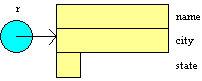
The pointer r is a pointer to a structure. Please note the
fact that r is a pointer, and therefore takes four bytes of
memory just like any other pointer. However, the malloc
statement allocates 45 bytes of memory from the heap. *r is a
structure just like any other structure of type Rec. The
following code shows typical uses of the pointer variable:
strcpy((*r).name, "Leigh");
strcpy((*r).city, "Raleigh");
strcpy((*r).state, "NC");
printf("%s\n", (*r).city);
free(r);
You deal with *r just like a normal structure variable, but
you have to be careful with the precedence of operators in C.
If you were to leave off the parenthesis around *r the code
would not compile because the "." operator has a higher
precedence than the "*" operator. Because it gets tedious to
type so many parentheses when working with pointers to
structures, C includes a shorthand notation that does exactly
the same thing:
strcpy(r->name, "Leigh");
The r-> notation is exactly equivilent to (*r).,
but takes two fewer characters.
Pointers to Arrays
It is also possible to create pointers to arrays, as shown
below:
	int *p;
	int i;

	p = (int *)malloc(sizeof(int[10]));
	for (i=0; i<10; i++)
		p[i] = 0;
	free(p);
or:
	int *p;
	int i;

	p = (int *)malloc(sizeof(int[10]));
	for (i=0; i<10; i++)
		*(p+i) = 0;
	free(p);
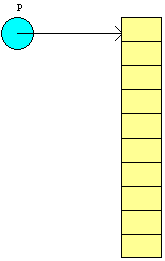
Note that when you create a pointer to an integer array,
you simply create a normal pointer to int. The call to malloc
allocates an array of whatever size you desire, and the
pointer points to that array's first element. You can either
index through the array pointed to by p using normal array
indexing, or you can do it using pointer arithmetic. C sees
both forms as equivilent.
This particular technique is extremely useful when working
with strings. It lets you allocate enough storage to exactly
hold a string of a particular size.
Arrays of Pointers
Sometimes a great deal of space can be saved, or certain
memory-intensive problems can be solved, by declaring an array
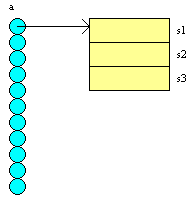
of pointers. In the example code below, an array of 10
pointers to structures is declared, instead of declaring an
array of structures. If an array of the structures had been
created instead, 243 * 10 = 2,430 bytes would have been
required for the array. Using the array of pointers allows the
array to take up minimal space until the actual records are
allocated with malloc statements. The code below simply
allocates one record, places a value in it, and disposes of
the record to demostrate the process:
typedef struct
{
char s1[81];
char s2[81];
char s3[81];
} Rec;
Rec *a[10];
a[0] = (Rec *)malloc(sizeof(Rec));
strcpy(a[0]->s1, "hello");
free(a[0]);
Structures containing Pointers
Structures can contain pointers, as shown below:
typedef struct
{
char name[21];
char city[21];
char phone[21];
char *comment;
} Addr;
Addr s;
char comm[100];
gets(s.name, 20);
gets(s.city, 20);
gets(s.phone, 20);
gets(comm, 100);
s.comment =
(char *)malloc(sizeof(char[strlen(comm)+1]));
strcpy(s.comment, comm);
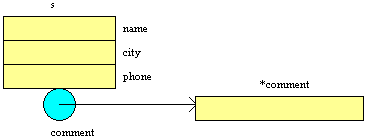
This technique is useful when only some records actually
contained a comment in the comment field. If there is no
comment for the record, then the comment field would consist
only of a pointer (4 bytes). Those records having a comment
then allocate exactly enough space to hold the comment string,
based on the length of the string typed by the user.
Pointers to Pointers
It is possible and often useful to create pointers to
pointers. This technique is sometimes called a handle,
and is useful in certain situations where the operating system
wants to be able to move blocks of memory on the heap around
at its discretion. The following example demonstrates a
pointer to a pointer:
	int **p;
	int *q;

	p = (int **)malloc(sizeof(int *));
	*p = (int *)malloc(sizeof(int));
	**p = 12;
	q = *p;
	printf("%d\n", *q);
	free(q);
	free(p);
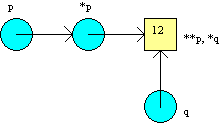
Windows and the Mac OS use this structure to allow memory
compaction on the heap. The program manages the pointer p,
while the operating system manages the pointer *p. Because the
OS manages *p, the block pointed to by *p (**p) can be moved,
and *p can be changed to reflect the move without affecting
the program using p. Pointers to pointers are also frequently
used in C to handle pointer parameters in functions.
Pointers to Structures Containing Pointers
It is also possible to create pointers to structures that
contain pointers. The following example uses the Addr
record from the previous section:
	typedef struct
	{
		char name[21];
		char city[21];
		char phone[21];
		char *comment;
	} Addr;
	Addr *s;
	char comm[100];

	s = (Addr *)malloc(sizeof(Addr));
	gets(s->name, 20);
	gets(s->city, 20);
	gets( s->phone, 20);
	gets(comm, 100);
	s->comment =
     (char *)malloc(sizeof(char[strlen(comm)+1]));
	strcpy(s->comment, comm);
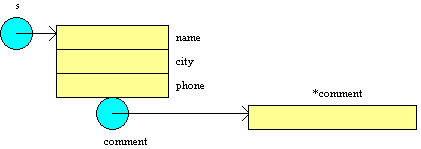
The pointer s points to a structure that contains a pointer
that points to a string:
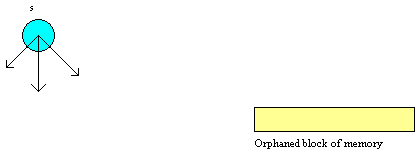
In this example, it is very easy to create lost blocks if
you aren't careful. For example, here is a different version
of the AP example.
	s = (Addr *)malloc(sizeof(Addr));
	gets(comm, 100);
	s->comment =
     (char *)malloc(sizeof(char[strlen(comm)+1]));
	strcpy(s->comment, comm);
	free(s);
This code creates a lost block because the structure
containing the pointer pointing to the string is disposed of
before the string block is disposed of, as shown below:
Linking
Finally, it is possible to create structures that are able
to point to identical structures, and this capability can be
used to link together a whole string of identical records in a
structure called a linked list.
 	typedef struct
	{
		char name[21];
		char city[21];
		char state[21];
		Addr *next;
	} Addr;
	Addr *first;
The compiler will let you do this, and it can be used with
a little experience to create structures like the one shown
below: 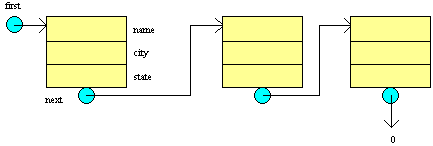
A linked Stack Example
A good example of dynamic data structures is a simple stack
library, one that uses a dynamic list and includes functions
to init, clear, push, and pop. The library's header file looks
like this:
/* Stack Library - This library offers the
   minimal stack operations for a
   stack of integers (easily changeable) */

typedef int stack_data;

extern void stack_init();
/* Initializes this library.
   Call first before calling anything. */

extern void stack_clear();
/* Clears the stack of all entries. */

extern int stack_empty();
/* Returns 1 if the stack is empty, 0 otherwise. */

extern void stack_push(stack_data d);
/* Pushes the value d onto the stack. */

extern stack_data stack_pop();
/* Returns the top element of the stack,
   and removes that element.
   Returns garbage if the stack is empty. */
The library's code file follows:
#include "stack.h"
#include <stdio.h>

/* Stack Library - This library offers the
   minimal stack operations for a stack of integers */

struct stack_rec
{
    stack_data data;
    struct stack_rec *next;
};

struct stack_rec *top=NULL;

void stack_init()
/* Initializes this library.
   Call before calling anything else. */
{
    top=NULL;
}

void stack_clear()
/* Clears the stack of all entries. */
{
    stack_data x;

    while (!stack_empty())
    x=stack_pop();
}

int stack_empty()
/* Returns 1 if the stack is empty, 0 otherwise. */
{
    if (top==NULL)
        return(1);
    else
        return(0);
}

void stack_push(stack_data d)
/* Pushes the value d onto the stack. */
{
    struct stack_rec *temp;
    temp=
  (struct stack_rec *)malloc(sizeof(struct stack_rec));
    temp->data=d;
    temp->next=top;
    top=temp;
}

stack_data stack_pop()
/* Returns the top element of the stack,
   and removes that element.
   Returns garbage if the stack is empty. */
{
    struct stack_rec *temp;
    stack_data d=0;
    if (top!=NULL)
    {
        d=top->data;
        temp=top;
        top=top->next;
        free(temp);
    }
    return(d);
}
Note how this library practices information hiding: Someone
who can see only the header file cannot tell if the stack is
implemented with arrays, pointers, files, or in some other
way. Note also that C uses NULL. NULL is defined in stdio.h,
so you will almost always have to include stdio.h when
you use pointers. NULL is the same as zero.
C Errors to Avoid
- Forgetting to include parentheses when you reference a
record, as in (*p).i above.
- Failing to dispose of any block you allocate. For
example, you should not say top=NULL in the stack
function, because that action orphans blocks that need to be
disposed.
- Forgetting to include stdio.h with any pointer
operations so that you have access to NULL.
Exercises
- Add a dup, a count, and an add
function to the stack library to duplicate the top element
of the stack, return a count of the number of elements in
the stack, and add the top two elements in the stack.
- Build a driver program and a makefile, and compile the
stack library with the driver to make sure it works.
Using Pointers with Arrays in C
Arrays and pointers are intimately linked in C. To use
arrays effectively, you have to know how to use pointers with
them. Fully understanding the relationship between the two
probably requires several days of study and experimentation,
but it is well worth the effort.
Let's start with a simple example of arrays in C:
#define MAX 10

int main()
{
    int a[MAX];
    int b[MAX];
    int i;
    for(i=0; i<MAX; i++)
        a[i]=i;
    b=a;
    return 0;
}
Enter this code and try to compile it. You will find that C
will not compile it. If you want to copy a into b,
you have to enter something like the following instead:
for (i=0; i<MAX; i++)
    a[i]=b[i];
Or, to put it more succinctly:
for (i=0; i<MAX; a[i]=b[i], i++);
Better yet, use the memcpy utility in string.h.
Arrays in C are unusual in that variables a and b
are not, technically, arrays themselves. Instead they are
permanent pointers to arrays. a and b
permanently point to the first elements of their respective
arrays - they hold the addesses of a[0] and b[0]
respectively. Since they are permanent pointers you
cannot change their addresses. The statement a=b;
therefore does not work.
Because a and b are pointers, you can do
several interesting things with pointers and arrays. For
example, the following code works:
#define MAX 10

void main()
{
    int a[MAX];
    int i;
    int *p;

    p=a;
    for(i=0; i<MAX; i++)
        a[i]=i;
    printf("%d\n",*p);
}
The statement p=a; works because a is a
pointer. Technically, a points to the address of the
0th element of the actual array. This element is an integer,
so a is a pointer to a single integer. Therefore,
declaring p as a pointer to an integer and setting it
equal to a works. Another way to say exactly the same
thing would be to replace p=a; with p=&a[0];.
Since a contains the address of a[0], a
and &a[0]mean the same thing.
The following figure shows the state of the variables right
before the for loop starts executing:
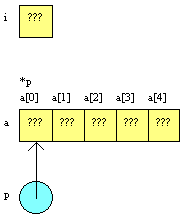
Now that p is pointing at the 0th element of a,
you can do some rather strange things with it. The a
variable is a permanent pointer and can not be changed, but
p is not subject to such restrictions. C actually
encourages you to move it around using pointer arithmetic
. For example, if you say p++;, the compiler knows
that p points to an integer, so this statement
increments p the appropriate number of bytes to move it
to the next element of the array. If p were pointing to
an array of 100-byte-long structures, p++; would move
p over by 100 bytes. C takes care of the details of
element size.
You can copy the array a into b using
pointers as well. The following code can replace (for i=0;
i<MAX; a[i]=b[i], i++); :
p=a;
q=b;
for (i=0; i<MAX; i++)
{
    *q = *p;
    q++;
    p++;
}
You can abbreviate this code as follows:
p=a;
q=b;
for (i=0; i<MAX; i++)
    *q++ = *p++;
And you can further abbreviate it to:
for (p=a,q=b,i=0; i<MAX; *q++ = *p++, i++);
What if you go beyond the end of the array a or b
with the pointers p or q? C does not care - it
blithely goes along incrementing p and q,
copying away over other variables with abandon. You need to be
careful when indexing into arrays in C, because C assumes that
you know what you are doing.
You can pass an array such as a or b to a
function in two different ways. Imagine a function dump
that accepts an array of integers as a parameter and prints
the contents of the array to stdout. There are two ways to
code dump:
void dump(int a[],int nia)
{
    int i;
     for (i=0; i<nia; i++)
        printf("%d\n",a[i]);
}
or:
void dump(int *p,int nia)
{
    int i;
     for (i=0; i<nia; i++)
        printf("%d\n",*p++);
}
The nia (number_in_array) variable is required so
that the size of the array is known. Note that only a pointer
to the array, rather than the contents of the array, is passed
to the function. Also note that C functions can accept
variable-size arrays as parameters.
الدرس التالي |

