Arrays in C
In this section, we will create a small C program that
generates 10 random numbers and sorts them. To do that we will
use a new variable arrangement called an array.
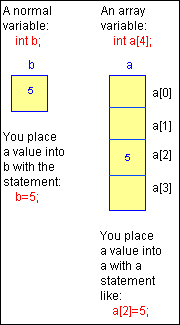 An array lets you declare and work with a collection of values
of the same type. For example, you might want to create a
collection of 5 integers. One way to do it would be to declare
5 integers directly:
An array lets you declare and work with a collection of values
of the same type. For example, you might want to create a
collection of 5 integers. One way to do it would be to declare
5 integers directly:
int a, b, c, d, e;
This is OK, but what if you needed a thousand integers? An
easier way is to declare an array of 5 integers.
int a[5];
The 5 separate integers inside this array are accessed by
an index. All arrays start at index zero and go to n-1
in C. Thus, int a[5]; contains 5 elements, and the
largest valid index is . For example:
int a[5];

a[0] = 12;
a[1] = 9;
a[2] = 14;
a[3] = 5;
a[4] = 1;
One of the nice things about array indexing is that you can
use a loop to manipulate the index. For example, the following
code intitializes all of the values in the array to 0:
int a[5];
int i;

for (i=0; i<5; i++)
    a[i] = 0;
The following code initializes the values in the array
sequentially and then prints them out:
#include <stdio.h>

int main()
{
    int a[5];
    int i;

    for (i=0; i<5; i++)
        a[i] = i;
    for (i=0; i<5; i++)
        printf("a[%d] = %d\n", i, a[i]);
}
Arrays are used all the time in C. To understand a common
usage, start an editor and enter the following code:
#include <stdio.h>

#define MAX 10

int a[MAX];
int rand_seed=10;

/* from K&R
   - returns random number between 0 and 32767.*/
int rand()
{
    rand_seed = rand_seed * 1103515245 +12345;
    return (unsigned int)(rand_seed / 65536) % 32768;
}

int main()
{
    int i,t,x,y;

    /* fill array */
    for (i=0; i < MAX; i++)
    {
        a[i]=rand();
        printf("%d\n",a[i]);
    }

    /* more stuff will go here in a minute */

    return 0;
}
This code contains several new concepts. The #define
line declares a constant named MAX and sets it to 10. Constant
names are traditionally written in all caps to make them
obvious in the code. The line int a[MAX]; shows you how
to declare an array of integers in C. Note that because
of the position of the array's declaration, it is global to
the entire program.
The line int rand_seed=10 also declares a global
variable, this time named rand_seed, that is
initialized to 10 each time the program begins. This value is
the starting seed for the random number code that follows. In
a real random number generator, the seed should initialize as
a random value, such as the system time. Here, the rand
function will produce the same values each time you run the
program.
The line int rand() is a function declaration. The
rand function accepts no parameters and returns an integer
value. We will learn more about functions on
this page.
The four lines that follow implement the rand
function. We will ignore them for now.
The main function is normal. Four local integers are
declared, and the array is filled with 10 random values using
a for loop. Note that the array a contains 10
individual integers. You point to a specific integer in the
array using square brackets. So a[0] refers to the
first integer in the array, a[1] refers to the second,
and so on. The line starting with /* and ending with */ is
called a comment. The compiler completely ignores the line.
You can place notes to yourself or other programmers in
comments.
Now add the following code in place of the more stuff
... comment:
/* bubble sort the array */
for (x=0; x < MAX-1; x++)
    for (y=0; y < MAX-x-1; y++)
        if (a[y] > a[y+1])
        {
            t=a[y];
            a[y]=a[y+1];
            a[y+1]=t;
        }
/* print sorted array */
printf("--------------------\n");
for (i=0; i < MAX; i++)
printf("%d\n",a[i]);
This code sorts the random values and prints them in sorted
order. Each time you run it you will get the same values. If
you would like to change the values that are sorted, change
the value of rand_seed each time you run the program.
The only easy way to truly understand what this code is
doing is to execute it "by hand". That is, assume MAX is 4 to
make it a little more manageable, take out a sheet of paper
and pretend like you are the computer. Draw the array on your
paper and put 4 random, unsorted values into the array.
Execute each line of the sorting section of the code and draw
out exactly what happens. You will find that, each time
through the inner loop, the larger values in the array are
pushed toward the bottom of the array and the smaller values
bubble up toward the top.
Exercises
- In the first piece of code, try changing the for loop
that fills the array to a single line of code. Make sure
that the result is the same as the original code.
- Take the bubble sort code out and put it into its own
function. (See article 6, if necessary.) The function header
will be void bubble_sort(). Then move the variables
used by the bubble sort to the function as well and make
them local there. Because the array is global, you do not
need to pass parameters.
- Initialize the random number seed to different values.
C Errors to avoid
- C has no range checking, so if you index past the end of
the array, it will not tell you about it. It will eventually
crash or give you garbage data.
- A function call must include "()" even if no parameters
are passed. For example, C will accept x=rand;, but
the call will not work. The memory address of the rand
function will be placed into x instead. You must say
x=rand();.
C Details
Variable types
There are 3 standard variable types in C:
Integer: int
Floating point: float
Character: char
An int is a 4-byte integer value. A float is a 4-byte
floating point value. A char is a 1-byte single character
(like 'a' or '3'). A string is declared as an array of
characters.
There are a number of derivative types:
- double (8-byte floating point value)
- short (2-byte integer)
- unsigned short or unsigned int (positive integers - no
sign bit)
Operators and Operator Precedence
The operators in C are similar to the operators in most
languages:
+ - addition
- - subtraction
/ - division
* - multiplication
% - mod
The / operator performs integer division if both operands
are integers and floating point division otherwise. For
example:
void main()
{
    float a;
    a=10/3;
    printf("%f\n",a);
}
This code prints out a floating point value since a is
declared as type float, but a will be 3.0
because the code performed an integer division.
Operator precedence in C is also similar to that in most
other languages. Division and multiplication occur first, then
addition and subtraction. The result of the calculation 5+3*4
is 17, not 32, because the * operator has higher precedence
than + in C. You can use parentheses to change the normal
precedence ordering. (5+3)*4 is 32. The 5+3 is evaluated first
because it is in parentheses. See
this page
for more information on precedence, which becomes somewhat
complicated in C once pointers are introduced.
Typecasting
C allows you to perform type conversions on the fly. You do
this especially often when using pointers. Typecasting also
occurs during the assignment operation for certain types. For
example, in the code above, the integer value was
automatically converted to a float.
You do typecasting in C by placing the type name in
parentheses and putting it in front of the value you want to
change. Thus, in the above code, replacing the line a=10/3;
with a=(float)10/3; produces 3.33333 as the result
because 10 is converted to a floating point value before the
division.
Types
You declare named, user-defined types in C with the
typedef statement. The following example shows a type that
appears often in C code:
#define TRUE  1
#define FALSE 0
typedef int boolean;

void main()
{
    boolean b;

    b=FALSE;
    blah blah blah
}
This code allows you to declare Boolean types in C
programs.
If you do not like the word ``float'' for real numbers, you
can say:
typedef float real;
and then later say:
real r1,r2,r3;
You can place typedef statements anywhere in a C program as
long as they come prior to their first use in the code.
Structures
Structures in C allow you to group variable into a package.
Here's an example:
struct rec
{
    int a,b,c;
    float d,e,f;
};

struct rec r;
As shown here, whenever you want to declare structures of
the type rec, you have to say struct rec. This line is
very easy to forget, and you get many compiler errors because
you absent-mindedly leave out the struct. You can
compress the code into the form:
struct rec
{
    int a,b,c;
    float d,e,f;
} r;
where the type declaration for rec and the variable
r are declared in the same statement. Or you can create
a typedef statement for the structure name. For example, if
you do not like saying struct rec r every time you want
to declare a record, you can say:
typedef struct rec rec_type;
and then declare records of type rec_type by saying:
rec_type r;
You access fields of structure using a period, for example,
r.a=5;.
Arrays
You declare arrays by inserting an array size after a
normal declaration, as shown below:
int a[10];        /* array of integers */
char s[100];      /* array of characters
                    (a C string) */
float f[20];      /* array of reals */
struct rec r[50]; /* array of records */
Incrementing
Long Way     Short Way
i=i+1;       i++;
i=i-1;       i--;
i=i+3;       i += 3;
i=i*j;       i *= j;
Exercises
- Try out different pieces of code to investigate
typecasting and precedence. Try out int, char,
float, and so on.
- Create an array of records and write some code to sort
that array on one integer field.
C error to avoid
- As described above, using the / operator with two
integers will often produce an unexpected result, so think
about it whenever you use it.
Functions in C
Most languages allow you to create functions of some sort.
Functions let you chop up a long program into named sections
so that the sections can be reused throughout the program.
Functions accept parameters and return a result.
C functions can accept an unlimited number of parameters. In
general, C does not care in what order you put your functions
in the program, so long as a the function name is known to the
compiler before it is called.
We have already talked a little about functions. The
rand function seen previously is about as simple as a
function can get. It accepts no parameters and returns an
integer result:
int rand()
/* from K&R
   - produces a random number between 0 and 32767.*/
{
    rand_seed = rand_seed * 1103515245 +12345;
    return (unsigned int)(rand_seed / 65536) % 32768;
}
The int rand() line declares the function rand to
the rest of the program and specifies that rand will accept no
parameters and return an integer result. This function has no
local variables, but if it needed locals, they would go right
below the opening { (C allows you to declare variables
after any { - they exist until the program reaches the
matching } and then they dissappear. A function's local
variables therefore vanish as soon as the matching } is
reached in the function. While they exist, local variables
live on the system stack.) Note that there is no ;
after the () in the first line. If you accidentally put
one in, you will get a huge cascade of error messages from the
compiler that make no sense. Also note that even though there
are no parameters, you must use the (). They tell the
compiler that you are declaring a function rather than simply
declaring an int.
The return statement is important to any function
that returns a result. It specifies the value that the
function will return and causes the function to exit
immediately. This means that you can place multiple return
statements in the function to give it multiple exit points. If
you do not place a return statement in a function, the
function returns when it reaches } and returns a random
value (many compilers will warn you if you fail to return a
specific value). In C, a function can return values of any
type: int, float, char, struct, etc.
There are several correct ways to call the rand
function. For example: x=rand();. The variable x
is assigned the value returned by rand in this statement. Note
that you must use () in the function call, even
though no parameter is passed. Otherwise, x is given
the memory address of the rand function, which is generally
not what you intended.
You might also call rand this way:
if (rand() > 100)
Or this way:
rand();
In the latter case, the function is called but the value
returned by rand is discarded. You may never want to do this
with rand, but many functions return some kind of error code
through the function name, and if you are not concerned with
the error code (for example, because you know that an error is
impossible) you can discard it in this way.
Functions can use a void return type if you intend to
return nothing. For example:
void print_header()
{
    printf("Program Number 1\n");
    printf("by Marshall Brain\n");
    printf("Version 1.0, released 12/26/91\n");
}
This function returns no value. You can call it with the
following statement:
print_header();
You must include () in the call. If you do not, the
function is not called, even though it will compile correctly
on many systems.
C functions can accept parameters of any type. For example:
int fact(int i)
{
    int j,k;

    j=1;
    for (k=2; k<=i; k++)
        j=j*k;
    return j;
}
returns the factorial of i, which is passed in as an
integer parameter. Separate multiple parameters with commas:
int add (int i, int j)
{
    return i+j;
}
C has evolved over the years. You will sometimes see
functions such as add written in the "old style," as
shown below:
int add(i,j)
    int i;
    int j;
{
    return i+j;
}
It is important to be able to read code written in the
older style. There is no difference in the way it executes; it
is just a different notation. You should use the "new style,"
(known as "ANSI C") with the type declared as part of the
parameter list, unless you know you will be shipping the code
to someone who has access only to an "old style" (non-ANSI)
compiler.
It is now considered good form to use function
prototypes for all functions in your program. A prototype
declares the function name, its parameters, and its return
type to the rest of the programprior to the function's actual
declaration. To understand why function prototypes are useful,
enter the following code and run it:
#include <stdio.h>

void main()
{
    printf("%d\n",add(3));
}

int add(int i, int j)
{
    return i+j;
}
This code compiles on many compilers without giving you a
warning, even though add expects two parameters but
receives only one. It works because many C compilers do not
check for parameter matching either in type or count. You can
waste an enormous amount of time debugging code in which you
are simply passing one too many or too few parameters by
mistake. The above code compiles properly, but it produces the
wrong answer.
To solve this problem, C lets you place function prototypes
at the beginning of (actually, anywhere in) a program. If you
do so, C checks the types and counts of all parameter lists.
Try compiling the following:
#include <stdio.h>

int add (int,int); /* function prototype for add */

void main()
{
    printf("%d\n",add(3));
}

int add(int i, int j)
{
    return i+j;
}
The prototype causes the compiler to flag an error on the
printf statement.
Place one prototype for each function at the beginning of
your program. They can save you a great deal of debugging
time, and they also solve the problem you get when you compile
with functions that you use before they are declared. For
example, the following code will not compile:
#include <stdio.h>

void main()
{
    printf("%d\n",add(3));
}

float add(int i, int j)
{
    return i+j;
}
Why, you might ask, will it compile when add returns an int
but not when it returns a float? Because older C compilers
default to an int return value. Using a prototype will solve
this problem. "Old style" (non-ANSI) compilers allow
prototypes, but the parameter list for the prototype must be
empty. Old style compilers do no error checking on parameter
lists.
Exercises
- Go back to the bubble sort example presented eariler and
create a function for the bubble sort.
- Go back to earlier programs and create a function to get
input from the user rather than taking the input in the main
function.
Libraries in C
Libraries are very important in C because the C language
supports only the most basic features that it needs. C does
not even contain I/O functions to read from the keyboard and
write to the screen. Anything that extends beyond the basic
language must be written by a programmer. The resulting chunks
of code are often placed in libraries to make them
easily reusable. We have seen the standard I/O, or stdio,
library already: Standard libraries exist for standard I/O,
math functions, string handling, time manipulation, and so on.
You can use libraries in your own programs to split up your
programs into modules. This makes them easier to understand,
test, and debug, and also makes it possible to reuse code from
other programs that you write.
You can create your own libraries easily. As an example, we
will take some code from a previous article in this series and
make a library out of two of its functions. Here's the code we
will start with:
#include <stdio.h>

#define MAX 10

int a[MAX];
int rand_seed=10;

int rand()
/* from K&R
   - produces a random number between 0 and 32767.*/
{
    rand_seed = rand_seed * 1103515245 +12345;
    return (unsigned int)(rand_seed / 65536) % 32768;
}

void main()
{
    int i,t,x,y;

    /* fill array */
    for (i=0; i < MAX; i++)
    {
        a[i]=rand();
        printf("%d\n",a[i]);
    }

    /* bubble sort the array */
    for (x=0; x < MAX-1; x++)
        for (y=0; y < MAX-x-1; y++)
            if (a[y] > a[y+1])
            {
                t=a[y];
                a[y]=a[y+1];
                a[y+1]=t;
            }

    /* print sorted array */
    printf("--------------------\n");
    for (i=0; i < MAX; i++)
        printf("%d\n",a[i]);
}
This code fills an array with random numbers, sorts them
using a bubble sort, and then displays the sorted list.
Take the bubble sort code, and use what you learned in the
previous article to make a function from it. Since both the
array a and the constant MAX are known globally, the
function you create needs no parameters, nor does it need to
return a result. However, you should use local variables for
x, y, and t.
Once you have tested the function to make sure it is
working, pass in the number of elements as a parameter rather
than using MAX:
#include <stdio.h>

#define MAX 10

int a[MAX];
int rand_seed=10;

/* from K&R
   - returns random number between 0 and 32767.*/
int rand()
{
    rand_seed = rand_seed * 1103515245 +12345;
    return (unsigned int)(rand_seed / 65536) % 32768;
}

void bubble_sort(int m)
{
    int x,y,t;
     for (x=0; x < m-1; x++)
        for (y=0; y < m-x-1; y++)
            if (a[y] > a[y+1])
            {
                t=a[y];
                a[y]=a[y+1];
                a[y+1]=t;
            }
}

void main()
{
    int i,t,x,y;
    /* fill array */
    for (i=0; i < MAX; i++)
    {
        a[i]=rand();
        printf("%d\n",a[i]);
    }
    bubble_sort(MAX);
    /* print sorted array */
    printf("--------------------\n");
    for (i=0; i < MAX; i++)
        printf("%d\n",a[i]);
}
You can also generalize the bubble_sort function
even more by passing in a as a parameter:
bubble_sort(int m, int a[])
This line says, "Accept the integer array a of any size as
a parameter." Nothing in the body of the bubble_sort
function needs to change. To call bubble_sort change the call
to:
bubble_sort(MAX, a);
Note that &a has not been used in the function call
even though the sort will change a. The reason for this
will become clear once you understand pointers.
Making a Library
Since the rand and bubble_sort functions in the program
above are useful, you will probably want to reuse them in
other programs you write. You can put them into a utility
library to make their reuse easier.
Every library consists of two parts: a header file and the
actual code file. The header file, normally denoted by a .h
suffix, contains information about the library that programs
using it need to know. In general, the header file contains
constants and types, along with prototypes for functions
available in the library. Enter the following header file and
save it to a file named util.h .
/* util.h */
extern int rand();
extern void bubble_sort(int, int []);
These two lines are function prototypes. The word "extern"
in C represents functions that will be linked in later. If you
are using an old-style compiler, remove the parameters from
the parameter list of bubble_sort.
Enter the following code into a file named util.c.
/* util.c */
#include "util.h"

int rand_seed=10;

/* from K&R
 - produces a random number between 0 and 32767.*/
int rand()
{
    rand_seed = rand_seed * 1103515245 +12345;
    return (unsigned int)(rand_seed / 65536) % 32768;
}

void bubble_sort(int m,int a[])
{
    int x,y,t;
     for (x=0; x < m-1; x++)
        for (y=0; y < m-x-1; y++)
            if (a[y] > a[y+1])
            {
                t=a[y];
                a[y]=a[y+1];
                a[y+1]=t;
            }
}
Note that the file includes its own header file (util.h)
and that it uses quotes instead of the symbols < and
> , which are used only for system libraries. As you can
see, this looks like normal C code. Note that the variable
rand_seed, because it is not in the header file, cannot be
seen or modified by a program using this library. This is
called information hiding. Adding the word static in
front of int enforces the hiding completely.
Enter the following main program in a file named main.c.
#include <stdio.h>
#include "util.h"

#define MAX 10

int a[MAX];

void main()
{
    int i,t,x,y;
    /* fill array */
    for (i=0; i < MAX; i++)
    {
        a[i]=rand();
        printf("%d\n",a[i]);
    }

    bubble_sort(MAX,a);

    /* print sorted array */
    printf("--------------------\n");
    for (i=0; i < MAX; i++)
        printf("%d\n",a[i]);
}
This code includes the utility library. The main benefit of
using a library is that the code in the main program is much
shorter.
Compiling and Running with a Library
To compile the library, type the following at the command
line (assuming you are using UNIX) (replace gcc with gcc if
your system uses cc):
gcc -c -g util.c
The -c causes the compiler to produce an object file for
the library. The object file contains the library's machine
code. It cannot be executed until it is linked to a program
file that contains a main function. The machine code resides
in a separate file named util.o.
To compile the main program, type the following:
gcc -c -g main.c
This line creates a file named main.o that contains
the machine code for the main program. To create the final
executable that contains the machine code for the entire
program, link the two object files by typing the following:
gcc -o main main.o util.o
which links main.o and util.o to form an
executable named main. To run it, type main.
Makefiles
It can be cumbersome to type all of the gcc lines
over and over again, especially if you are making a lot of
changes to the code and it has several libraries. The make
facility solves this problem. You can use the following
makefile to replace the compilation sequence above:
main: main.o util.o
        gcc -o main main.o util.o
main.o: main.c util.h
        gcc -c -g main.c
util.o: util.c util.h
        gcc -c -g util.c
Enter this into a file named makefile, and type
make to build the executable. Note that you must
precede all gcc lines with a tab. (Eight spaces will
not suffice---it must be a tab. All other lines must be flush
left.)
This makefile contains two types of lines. The lines
appearing flush left are dependency lines. The lines preceded
by a tab are executable lines, which can contain any valid
UNIX command. A dependency line says that some file is
dependent on some other set of files. For example, main.o:
main.c util.h says that the file main.o is
dependent on the files main.c and util.h. If
either of these two files changes, the following executable
line(s) should be executed to recreate main.o.
Note that the final executable produced by the whole
makefile is main, on line 1 in the makefile. The final result
of the makefile should always go on line 1, which in this
makefile says that the file main is dependent on
main.o and util.o. If either of these changes,
execute the line gcc -o main main.o util.o to recreate
main.
It is possible to put multiple lines to be executed below a
dependency line---they must all start with a tab. A large
program may have several libraries and a main program. The
makefile automatically recompiles everything that needs to be
recompiled because of a change.
If you are not working on a UNIX machine, your compiler
almost certainly has functionality equivalent to makefiles.
Read the documentation for your compiler to learn how to use
it.
Now you understand why you have been including stdio.h in
earlier programs. It is simply a standard library that someone
created long ago and made available to other programmers to
make their lives easier.
Text Files in C
Text files in C are straightforward and easy to understand.
All text file functions and types in C come from the stdio
library.
When you need text I/O in a C program, and you need only
one source for input information and one sink for output
information, you can rely on stdin (standard in) and stdout
(standard out). You can then use input and output redirection
at the command line to move different information streams
through the program. There are six different I/O commands in
<stdio.h> that you can use with stdin and stdout:
printf		prints formatted output to stdout
scanf		reads formatted input from stdin
puts		prints a string to stdout
gets		reads a string from stdin
putc		prints a character to stdout
getc, getchar	reads a character from stdin
The advantage of stdin and stdout is that they are easy to
use. Likewise, the ability to redirect I/O is very powerful.
For example, maybe you want to create a program that reads
from stdin and counts the number of characters:
#include <stdio.h>
#include <string.h>

void main()
{
    char s[1000];
    int count=0;
     while (gets(s))
        count += strlen(s);
    printf("%d\n",count);
}
Enter this code and run it. It waits for input from stdin,
so type a few lines. When you are done, press CTRL-D to signal
end-of-file (eof). The gets function reads a line until it
detects eof, then returns a 0 so that the while loop ends.
When you press CTRL-D, you see a count of the number of
characters in stdout (the screen). (use man gets or
your compiler's documentation to learn more about the gets
function.)
Now, suppose you want to count the characters in a file. If
you compiled the program to an executable named xxx,
you can type the following:
xxx < filename
Instead of accepting input from the keyboard, the contents
of the file named filename will be used instead. You
can achieve the same result using pipes:
cat < filename | xxx
You can also redirect the output to a file:
xxx < filename > out
This command places the character count produced by the
program in a text file named out.
Sometimes, you need to use a text file directly. For
example, you might need to open a specific file and read from
or write to it. You might want to manage several streams of
input or output or create a program like a text editor that
can save and recall data or configuration files on command. In
that case, use the text file functions in stdio:
fopen	opens a text file
fclose	closes a text file
feof	detects end-of-file marker in a file
fprintf	prints formatted output to a file
fscanf	reads formatted input from a file
fputs	prints a string to a file
fgets	reads a string from a file
fputc	prints a character to a file
fgetc	reads a character from a file
You use fopen to open a file. It opens a file for a
specified mode (the three most common are r, w, and a, for
read, write, and append). It then returns a file pointer that
you use to access the file. For example, suppose you want to
open a file and write the numbers 1 to 10 in it. You could use
the following code:
#include <stdio.h>
#define MAX 10

int main()
{
    FILE *f;
    int x;
    f=fopen("out","w");
    if (!f)
        return 1;
    for(x=1; x<=MAX; x++)
        fprintf(f,"%d\n",x);
    fclose(f);
    return 0;
}
The fopen statement here opens a file named out
with the w mode. This is a destructive write mode, which means
that if out does not exist it is created, but if it
does exist it is destroyed and a new file is created in its
place. The fopen command returns a pointer to the file, which
is stored in the variable f. This variable is used to refer to
the file. If the file cannot be opened for some reason, f will
contain NULL.
The fprintf statement should look very familiar: It is just
like printf but uses the file pointer as its first parameter.
The fclose statement closes the file when you are done.
To read a file, open it with r mode. In general, it is not
a good idea to use fscanf for reading: Unless the file
is perfectly formatted, fscanf will not handle it correctly.
Instead, use fgets to read in each line and then parse
out the pieces you need.
The following code demonstrates the process of reading a
file and dumping its contents to the screen:
The fgets statement returns a NULL value at the end-of-file
marker. It reads a line (up to 1,000 characters in this case)
and then prints it to stdout. Notice that the printf statement
does not include \n in the format string, because fgets adds
\n to the end of each line it reads. Thus, you can tell if a
line is not complete in the event that it overflows the
maximum line length specified in the second parameter to
fgets.

